What is Network Jitter in Audio Streaming?
Imagine your live broadcast is a steady stream of cars heading to a single destination: your listener's speakers. In a perfect world, these cars (which are actually small bundles of audio data called packets) would travel at the same speed and arrive in perfect, evenly spaced order. The internet, however, is more like a chaotic city grid than a perfect highway. Packets can take different routes, encounter traffic jams (network congestion), or get held up at intersections (routers).
Network jitter is the term for this variation in packet arrival time. It's the inconsistency in the delay between when packets are sent from your streaming server and when they arrive at the listener's device. Some packets might arrive early, some late, and some might even arrive out of order.
Visually, you can think of it like this:
Ideal Packet Flow (No Jitter):
Packet 1   Packet 2   Packet 3   Packet 4   Packet 5
[ 10ms ]---[ 10ms ]---[ 10ms ]---[ 10ms ]---[ 10ms ]---> Listener

Real-World Packet Flow (With Jitter):
Packet 1   Packet 2      Packet 3  Packet 4         Packet 5
[ 8ms ]----[ 15ms ]------[ 7ms ]---[ 20ms ]---------[ 9ms ]---> Listener
When your listener's device tries to play this jumbled stream of packets directly, the results are disastrous for audio quality. You'll hear:
- Glitches and Skips: A packet arrives too late, and there's a moment of silence.
- Dropouts: Packets get lost entirely, causing longer gaps in the audio.
- Robotic or Garbled Sound: Packets arrive out of order, and the player struggles to reassemble the original audio waveform, resulting in distorted sound.
This isn't necessarily a reflection of your own internet connection or your listener's. Jitter can be introduced at any point across the public internet. It's an inherent challenge of real-time data transmission, and solving it is key to a professional-sounding broadcast.
Pro Tip: Jitter is Unavoidable
Even with the fastest fiber optic connections at both ends, the complex path your data travels across the global internet makes some level of jitter inevitable. A robust streaming strategy doesn't try to eliminate jitter entirely; it manages it intelligently. This is where jitter buffers become your most important tool.
How Does a Jitter Buffer Work?
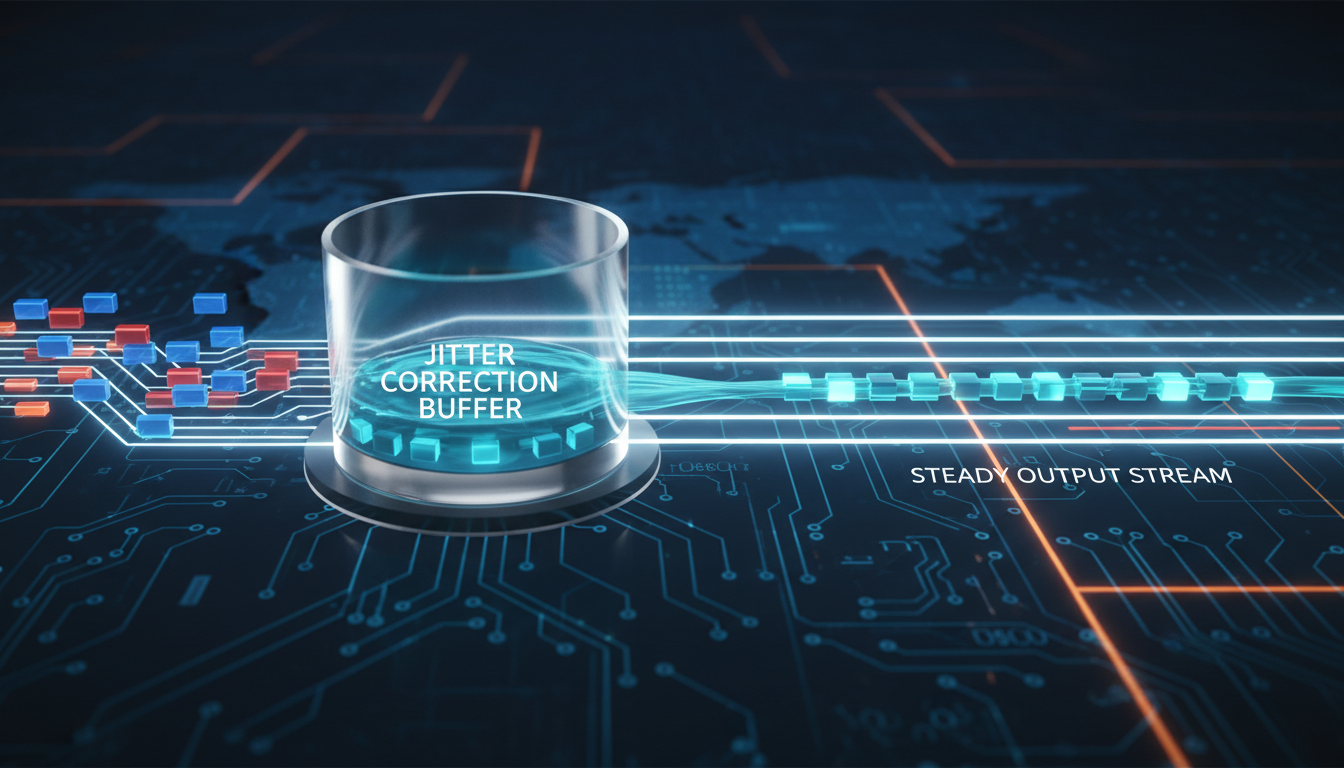
A jitter buffer (sometimes called a de-jitter buffer or playback buffer) is a small, temporary storage area on the listener's device (in their web browser, mobile app, or smart speaker). Its job is simple but brilliant: to absorb the chaos of the network and create a perfectly smooth, orderly stream of audio for playback.
Think of it as a reservoir. Rain (your audio packets) might fall inconsistently, but the reservoir collects it all and releases a perfectly steady, predictable flow of water through the dam. The jitter buffer does the same for your audio data.
The Step-by-Step Process
- Packet Arrival: Audio packets arrive from the Shoutcast Net server in a potentially jumbled, uneven sequence.
- Buffering & Reordering: The jitter buffer catches these packets. Each packet has a timestamp, so the buffer can place them in the correct order, ready for playback.
- Controlled Playback: The listener's media player doesn't play the packets as they arrive. Instead, it pulls them from the buffer at a constant, precise rate (e.g., one packet every 20 milliseconds).
- Smoothing: This process effectively "hides" the network jitter from the listener. As long as the buffer has packets ready to go, the audio plays back flawlessly, even if the live network feed is temporarily erratic.
Network Input (Jitter)
P1--P2----P3--P4------P5---> [ JITTER BUFFER ] ---> P1-P2-P3-P4-P5- (Smooth Output)
                             | Holding Area |
                             | Re-orders    |
                             | Times output |
                             +--------------+
Buffer Problems: Underrun and Overrun
The system works perfectly unless the buffer is improperly sized.
- Buffer Underrun (Starvation): If network jitter is severe and the buffer is too small, it can run out of packets. The player has nothing to play, resulting in a noticeable silence or stutter until more packets arrive to refill the buffer.
- Buffer Overrun (Overflow): If the buffer is too large and packets arrive faster than they are played, the buffer can fill up. When this happens, new incoming packets are dropped, which can also cause audio artifacts. This is less common with modern adaptive buffers.
Pro Tip: Trust the Defaults
Modern audio players have sophisticated, built-in jitter buffers. For 99% of broadcasters, the default buffer settings in web players and apps are optimized for the best performance. You typically don't need to configure this yourself; the magic happens automatically on the listener's end. Your job is to provide a stable stream from your end, which we'll cover later.
Fixed vs. Adaptive Jitter Buffers: Which is Better?
Jitter buffers come in two main flavors: fixed and adaptive. While the listener's player client makes this choice, understanding the difference helps you appreciate the technology that makes your stream sound great.
Fixed Jitter Buffers
A fixed jitter buffer has a constant, pre-defined size, measured in milliseconds (ms). For example, a 200ms fixed buffer will always try to hold 200ms of audio. It's simple and predictable, but it's a "one size fits all" approach that doesn't account for changing network conditions.
Adaptive Jitter Buffers
An adaptive (or dynamic) jitter buffer is the smarter, modern approach. It constantly monitors the network's jitter level in real-time. If jitter increases, the buffer grows larger to provide more protection against dropouts. If the network becomes stable and jitter decreases, the buffer shrinks to reduce latency.
Comparison at a Glance
| Feature | Fixed Jitter Buffer | Adaptive Jitter Buffer |
|---|---|---|
| Size | Static (e.g., always 200ms) | Dynamic (e.g., varies from 50ms to 800ms) |
| Performance | Can fail (underrun) if jitter exceeds its fixed size. Adds unnecessary latency on stable networks. | Expands to handle jitter spikes, shrinks to reduce latency when possible. Provides the best balance. |
| Complexity | Very simple, low CPU overhead. | More computationally complex, but easily handled by modern devices. |
| Best For | Predictable, stable networks (e.g., private LANs). Largely obsolete for public internet streaming. | Virtually all modern internet audio/video streaming. This is the standard. |
The verdict is clear: Adaptive jitter buffers are vastly superior for delivering a high-quality experience to a diverse audience over the public internet. They provide the resilience of a large buffer when needed and the low latency of a small buffer when the network allows.
Pro Tip: Shoutcast Net is Built for Adaptive Technology
Our entire server infrastructure is designed to provide clean, well-timed packet delivery that works in perfect harmony with the adaptive jitter buffers found in today's web browsers and mobile apps. We ensure your stream is delivered in a way that gives client-side buffers the best possible chance to succeed, no matter where your listeners are. Ready to see the difference? Try our 7 days trial.
The Trade-Off: Jitter Buffers and Latency
There is no free lunch in streaming. The primary function of a jitter buffer—holding onto audio before playing it—introduces a delay. This delay is known as latency. The relationship is direct and unavoidable:
Larger Jitter Buffer = Higher Latency
If a player client uses a 2,000ms (2-second) jitter buffer, it will introduce, at minimum, a 2-second delay to your stream on top of all other network and encoding delays. This creates a fundamental trade-off for every live stream:
-
Maximum Stability: A large buffer (e.g., 8-15 seconds) provides a massive cushion against even the most severe network jitter. The stream will be incredibly stable and resistant to dropouts.
- Best for: Music radio, 24/7 broadcasts, and any content where stability is far more important than real-time interaction.
-
Minimum Latency: A small buffer (e.g., under 1 second) keeps the delay between you and your listeners to a minimum, creating a more "live" feel.
- Best for: Live talk shows with call-ins, sports commentary, remote interviews, and any content where interaction is key.
At Shoutcast Net, we provide powerful options to manage this trade-off. While standard Shoutcast hosting and Icecast hosting are optimized for stability, we also offer advanced configurations that can achieve a **very low latency 3 sec** or less, perfect for more interactive broadcasts. This is possible through our support for modern protocols, allowing you to **stream from any device to any device** with optimized settings.
Pro Tip: Know Your Content
Ask yourself: "Does my audience need to interact with me in real-time?" If you're a DJ playing music sets or a podcaster broadcasting a pre-recorded show, the answer is no. In this case, embrace the slightly higher latency that comes with a larger, more stable buffer. It will result in a better listening experience for 100% of your audience, especially those on spotty mobile connections.
How Shoutcast Net's Infrastructure Minimizes Jitter
While the jitter buffer works on the listener's device, the quality of your streaming server has a massive impact on how much work that buffer has to do. A cheap, overloaded, or poorly-located server is a primary source of jitter. At Shoutcast Net, we've engineered our platform from the ground up to provide the most stable and reliable stream delivery possible, starting at an incredible $4/month.
A Superior Network Foundation
Our servers are located in premium Tier-1 data centers around the globe. This means we have direct, high-speed connections to major internet backbones. For your stream, this translates to:
- Fewer Hops: Your data takes a more direct route from your encoder to our server and from our server to your listeners, reducing the opportunities for jitter to be introduced.
- Reduced Congestion: We don't operate on oversold consumer-grade networks. Our enterprise-grade bandwidth ensures your stream isn't competing for resources.
- Guaranteed 99.9% Uptime: Our redundant infrastructure means your stream stays online, providing a consistent source for your listeners' jitter buffers to pull from.
Flexible Ingest and Modern Protocols
Legacy Shoutcast servers have limitations. Our platform is a modern media server powerhouse. We can transcode **any stream protocols to any stream protocols (RTMP, RTSP, WebRTC, SRT, etc)**. This means whether you're broadcasting from a simple audio encoder or a complex video production suite, we provide a stable, high-performance ingest point that's far superior to older, more limited services.
Predictable, Unlimited Billing vs. The Competition
This is where Shoutcast Net truly shines. Competing platforms like Wowza often use a complex and expensive per-hour or per-viewer billing model. If your stream goes viral, you could be hit with a massive, unexpected bill.
We believe that's an anti-growth model. Our plans are simple: a flat monthly rate for up to 1,000 listeners and unmetered bandwidth. You can grow your audience without fear. Focus on creating great content, not on calculating bandwidth costs. This predictable pricing, combined with powerful features like our **AutoDJ** system and free SSL streaming, provides unparalleled value.
Pro Tip: Experience the Stability Firsthand
Don't just take our word for it. The best way to understand the Shoutcast Net difference is to experience it. Sign up for our free 7 days trial. Set up a stream in minutes and compare the rock-solid performance to any other service you've used. You'll feel the stability and see the value immediately.
Best Practices for Your Encoder Settings
You can't control your listener's jitter buffer, but you can control what you send to our servers. A clean, stable, and consistent outbound stream from your encoder is the first and most important step to a great-sounding broadcast. Here are the key settings to focus on in your software (like OBS, BUTT, RadioBOSS, Mixxx, etc.).
1. Use a Wired Connection (Always!)
This is the single most important thing you can do. Wi-Fi is susceptible to interference and packet loss, which creates jitter before your stream even leaves your building. Plug your broadcasting computer directly into your router with an Ethernet cable for a rock-solid local connection.
2. Choose Constant Bitrate (CBR)
When configuring your audio codec (like AAC or MP3), you'll often see options for Variable Bitrate (VBR) and Constant Bitrate (CBR). For live streaming, always choose CBR.
- CBR sends a predictable, constant amount of data every second (e.g., 128 kbps). This is easy for networks and jitter buffers to handle.
- VBR varies the data rate based on the complexity of the audio. While efficient for file storage, this unpredictability can contribute to network jitter in a live scenario.
# Example Encoder Setting (Conceptual)

[codec_options]
codec = aac
bitrate = 128         # Measured in kbps
mode = cbr            # Use 'cbr', not 'vbr'
samplerate = 44100
3. Select the Right Protocol
Our servers are flexible, but for audio-only streaming, we recommend connecting to your Icecast mount point. Icecast (which is fully SHOUTcast v2 compatible) offers more robust metadata support (for song titles and artists) than legacy SHOUTcast v1 protocols. For video, RTMP is the industry standard and a highly reliable choice for ingest. Our platform also makes it easy to **Restream to Facebook, Twitch, YouTube** simultaneously.
4. Configure Your Fallback: The AutoDJ Safety Net
Even with a perfect setup, your home or studio internet connection could fail. This is where the Shoutcast Net **AutoDJ** system is a lifesaver. You can upload a playlist of music, station IDs, and announcements to your server. If your live connection ever drops, the AutoDJ automatically takes over, keeping your station on the air seamlessly. When you reconnect, it fades out and your live show takes over again. This ensures there's always a stable source for your listeners, preventing dead air.
Pro Tip: Your Pre-Broadcast Checklist
Before every live show, run through this quick mental checklist:
- Am I connected via a wired Ethernet cable?
- Is my encoder set to a Constant Bitrate (CBR)?
- Have I run a brief test stream to ensure audio levels are correct?
- Is my AutoDJ loaded with a fallback playlist, just in case?
Following these simple steps will solve 90% of common stream quality issues.