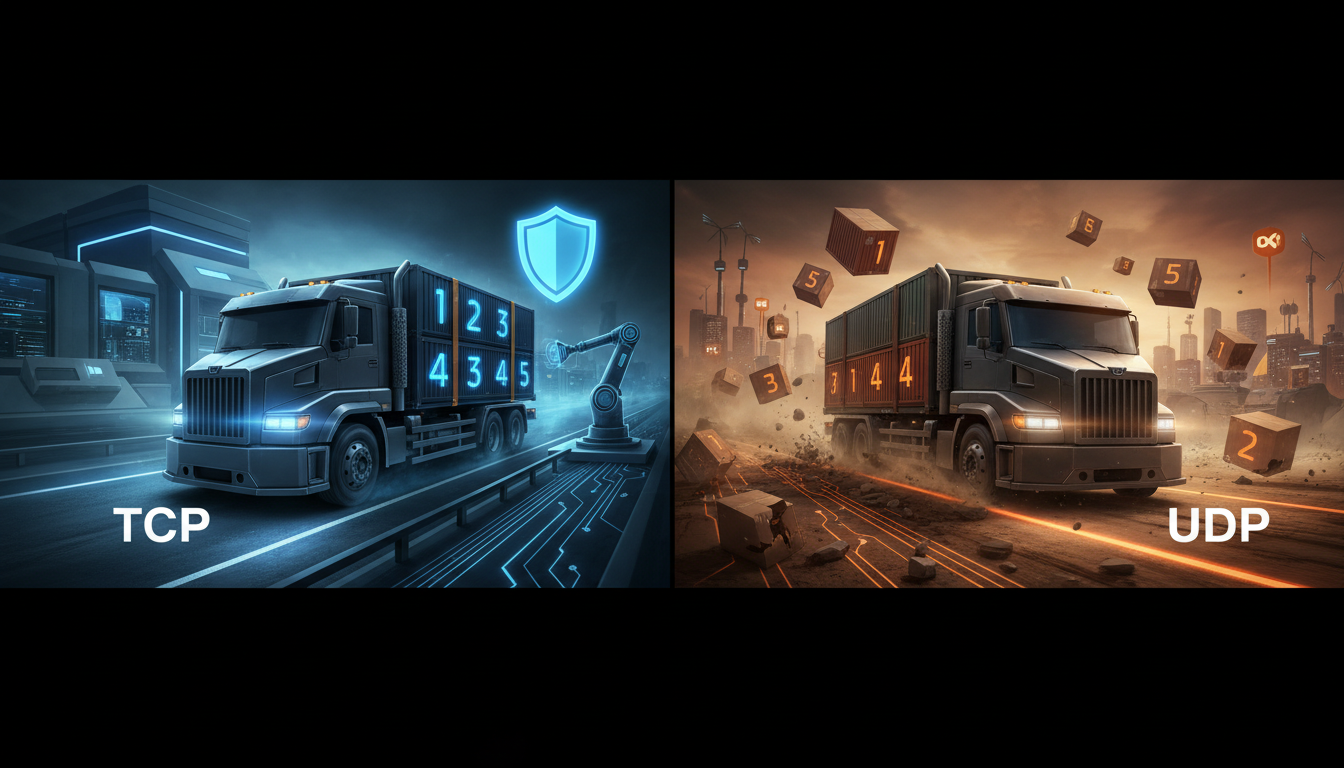
Welcome, Broadcaster! You're passionate about your content—be it music, sermons, sports commentary, or live events. But in the world of streaming, the quality of your broadcast hinges on technology you might never see: the transport protocols that carry your signal across the internet. The two main players are TCP and UDP.
Understanding the difference isn't just for network engineers. Choosing the right approach can mean the difference between a frustrating, buffered stream and a smooth, ultra-low latency broadcast that delights your audience. This guide will demystify these protocols and show you how to make the best choice for your Shoutcast or Icecast stream.
What are TCP and UDP? (An Analogy for Broadcasters)
Imagine the internet is a global postal service. Your stream isn't sent as one big file; it's broken down into thousands of tiny digital "packets," like individual postcards. TCP and UDP are two different ways of sending these postcards from your broadcast computer to our servers, and ultimately, to your listeners.
TCP: The Certified Mail Service
TCP (Transmission Control Protocol) is like sending a package via a premium, signed-for delivery service.
- A connection is established first: Before any data is sent, the sender (your encoder) and receiver (the server) perform a "three-way handshake" to confirm they're both ready. It's like calling the recipient to let them know a package is on its way.
- Every packet is numbered and tracked: Each packet has a sequence number.
- Receipt is confirmed: The receiver sends back acknowledgements ("ACKs") for packets it receives.
- Lost packets are resent: If the sender doesn't get an ACK for a packet, it assumes it was lost and sends it again.
- Packets are reassembled in order: The receiver uses the sequence numbers to put the postcards back in the correct order, ensuring the message is read exactly as it was written.
This process is incredibly reliable. You can be 100% certain that every single bit of your data will arrive, and in the correct order. This is perfect for things like loading a webpage or downloading a file, where a single missing packet could corrupt the entire thing.
UDP: The Fast, No-Frills Messenger
UDP (User Datagram Protocol) is the opposite. It's like dropping a stack of postcards in the mailbox and hoping for the best.
- No connection is established: You just start sending packets. It's "fire and forget."
- No tracking or numbering (by default): Packets are sent out without any inherent sequence.
- No confirmation of receipt: The sender has no idea if the packets arrived.
- Lost packets are gone forever: If a postcard gets lost in the mail, it's simply gone. The sender won't resend it.
- Packets can arrive out of order: Postcard #3 might arrive before postcard #1.
This sounds terrible, right? Why would anyone use it? The answer is one word: speed. By skipping all the handshakes, acknowledgements, and retransmissions, UDP is incredibly fast and has very little overhead. This makes it ideal for real-time applications where a slight imperfection is better than a long delay.
Pro Tip for Broadcasters
Think of it in terms of your stream. With TCP, if a packet of audio from 5 seconds ago is lost, the whole stream might pause (buffer) to wait for it to be resent. With UDP, the stream might just skip that tiny fraction of a second of audio and keep playing in near real-time. For a live broadcast, which is more disruptive to the listener: a 10-second buffer or a tiny, imperceptible audio hiccup?
TCP: The Reliable Delivery Service (Pros & Cons)
Let's dig deeper into the mechanics of TCP and how it impacts streaming. The cornerstone of TCP is its reliability, enforced by the "three-way handshake" and constant acknowledgements.
How TCP Establishes a Connection
Before your stream starts, your encoder and the server have a quick chat:
Your Encoder        SYN (I want to connect!)        --->   Shoutcast Net Server
Your Encoder        <---   SYN/ACK (Okay, I hear you!)      Shoutcast Net Server
Your Encoder        ACK (Great, connection established!) --->   Shoutcast Net Server
Only after this handshake is complete does your actual stream data begin to flow. During the stream, this "conversation" continues, with the server constantly sending ACK packets back to your encoder to confirm receipt. This back-and-forth communication adds overhead and, critically, latency.
Pros of Using TCP for Streaming
- Guaranteed Delivery: You can be absolutely certain that 100% of your stream data will reach the server. This is crucial for certain types of streaming, especially where on-demand file integrity is important.
- Simplicity for Broadcasters: Many popular and legacy streaming protocols, like RTMP (Real-Time Messaging Protocol) and standard HTTP-based Shoutcast/Icecast source connections, are built on TCP. They are widely supported in software like OBS, BUTT, and RadioBOSS, making them easy to set up.
- Network Congestion Control: TCP has built-in mechanisms to slow down data transmission if it detects the network is congested, which can help prevent packet loss in the first place.
Cons of Using TCP for Streaming
- Higher Latency: This is the big one. The time it takes to send a packet, wait for the ACK, and re-transmit if necessary, directly adds to your stream's delay. This "round-trip time" (RTT) can easily add several seconds of latency, making real-time interaction with your audience difficult.
- Buffering: If packets are lost, TCP insists on re-transmitting them. While waiting for the lost packet to arrive, the listener's player has nothing to play, resulting in the dreaded "Buffering..." message. This is known as "head-of-line blocking."
- Inefficient for Real-Time Data: For a live audio stream, a packet of audio from 10 seconds ago is useless. Resending it just wastes bandwidth and causes delays, but TCP doesn't know that. It treats every packet as critical.
Pro Tip: RTMP and TCP
RTMP is a very common protocol for sending your stream from OBS to a server, and it exclusively uses TCP. While reliable, it's a major reason why many streams have a built-in latency of 5-15 seconds. At Shoutcast Net, we've engineered our RTMP ingest points to be highly optimized, but the protocol itself has inherent latency. For the lowest possible delay, you'll want to look at UDP-based alternatives.
UDP: The Fast, No-Frills Messenger (Pros & Cons)
UDP throws the rulebook out the window in pursuit of one thing: speed. It's a connectionless protocol, meaning your encoder starts blasting packets to the server without any prior handshake. This "fire-and-forget" approach is the foundation of modern low-latency streaming.
The "Best-Effort" Delivery Model
UDP operates on a simple premise: it's better to miss a tiny, insignificant piece of data than to halt the entire stream to wait for it. Think of a live video call. If the connection briefly hiccups, you might see a momentary pixelation or hear a tiny audio drop, but the call continues in near real-time. If it used TCP, the call would freeze completely for several seconds to recover that lost data, making conversation impossible.
This is why UDP is the transport of choice for:
- Live video and audio streaming (WebRTC, SRT)
- Online multiplayer gaming
- VoIP calls (like Skype or Discord)
- DNS lookups
Pros of Using UDP for Streaming
- Extremely Low Latency: By eliminating handshakes, acknowledgements, and retransmissions, UDP minimizes the delay between your studio and the server. This is how services like Shoutcast Net can achieve a **very low latency 3 sec** glass-to-glass delay.
- Low Overhead: UDP packets have a much smaller header than TCP packets, meaning more of your bandwidth is used for actual audio/video data, not protocol management.
- No Head-of-Line Blocking: If a packet is lost, the stream just moves on. The player doesn't pause and buffer waiting for old data, leading to a much smoother (though potentially less perfect) experience on unstable networks.
Cons of Using UDP for Streaming
- Unreliable Delivery (by itself): Basic UDP doesn't guarantee delivery. Packets can and do get lost, especially on poor Wi-Fi or mobile connections.
- No In-built Ordering: Packets can arrive out of order, which could theoretically garble the audio or video if not handled by a higher-level protocol.
- Requires a "Smarter" Application: Because UDP itself is so basic, the application protocol sitting on top of it (like SRT or WebRTC) has to be smart. These protocols implement their own lightweight error correction and packet ordering mechanisms that are far more efficient for media than TCP's brute-force approach.
Pro Tip: The Rise of SRT
SRT (Secure Reliable Transport) is a revolutionary protocol built on UDP. It provides the speed of UDP but adds just enough reliability—like selective retransmission of only the most critical lost packets—to give you the best of both worlds. It's the gold standard for low-latency contribution, and Shoutcast Net fully supports SRT ingest. This allows you to **stream from any device to any device** with incredible performance.
Comparison Table: TCP vs. UDP at a Glance
Here’s a quick-reference table to summarize the key differences for a broadcaster.
| Feature | TCP (Transmission Control Protocol) | UDP (User Datagram Protocol) |
|---|---|---|
| Reliability | High. Guaranteed packet delivery through acknowledgements and retransmissions. | Low (by itself). "Best-effort" delivery. Packets can be lost. |
| Ordering | Guaranteed. Packets are sequenced and reassembled in the correct order. | Not guaranteed. Packets can arrive out of order. |
| Speed / Latency | Slower / Higher Latency. The overhead of handshakes and ACKs adds significant delay. | Faster / Very Low Latency. Minimal overhead allows for near real-time transmission. |
| Connection Setup | Connection-oriented. Requires a three-way handshake before data transfer. | Connectionless. "Fire and forget." Data can be sent immediately. |
| Header Size (Overhead) | Larger (20 bytes minimum), carrying sequence numbers, ACK numbers, etc. | Smaller (8 bytes), containing only essential port and length information. |
| Congestion Control | Built-in. TCP will slow down to avoid overwhelming the network. | None. Can lead to packet loss if the sending rate exceeds network capacity. |
| Streaming Use Case | Good for on-demand video or when absolute file integrity is needed. Used by legacy protocols like RTMP. Tolerable for traditional internet radio. | Ideal for live, interactive broadcasts, sports, gaming, and any scenario where minimizing delay is the top priority. |
| Common Application Protocols | HTTP, HLS, RTMP, FTP, SMTP | RTP (the basis of WebRTC and SRT), DNS, VoIP |
Which Protocol Should You Use for Your Shoutcast/Icecast Stream?
So, with all this technical detail, what's the practical advice for you, the broadcaster? The answer depends on your specific goals for your stream.
Scenario 1: Traditional Internet Radio Station (e.g., Music, Talk Radio)
For a classic 24/7 internet radio station using our AutoDJ or broadcasting pre-recorded shows, latency isn't a major concern. A 10-20 second delay is perfectly acceptable. In this case, using the standard TCP-based connection from your encoder (like BUTT, RadioBOSS, or Mixxx) to your Shoutcast hosting or Icecast server is simple, reliable, and universally supported. It just works.
The reliability of TCP ensures your stream to our server is perfect, and our high-capacity distribution network handles delivery to your listeners with minimal buffering, backed by our 99.9% uptime guarantee.
Scenario 2: Live, Interactive Events (e.g., Live DJ Sets, Podcasting, Church Services, Sports)
This is where the choice makes a huge difference. If you want to interact with your audience in real-time (e.g., taking calls, reading live chat comments), you need the lowest possible latency. A 15-second delay makes this impossible.
This is where UDP-based protocols shine.
Your goal should be to get your stream from your encoder (OBS, vMix, etc.) to the Shoutcast Net server as fast as possible. We recommend using SRT (Secure Reliable Transport). By sending your stream to us via SRT, you leverage the speed of UDP while still getting the reliability needed for a professional broadcast. This is how you can achieve that game-changing very low latency 3 sec performance.
Once your stream hits our servers, our powerful transcoding engine takes over. We can then deliver it to your audience using modern formats like low-latency HLS or DASH, ensuring a great experience on any device. Our platform is built to handle **any stream protocols to any stream protocols (RTMP, RTSP, WebRTC, SRT, etc)**, giving you ultimate flexibility.
Pro Tip: Your First Low-Latency Stream
Ready to try it? In OBS Studio, go to Settings > Stream. For "Service," choose "Custom." For "Server," enter the SRT URL we provide in your Shoutcast Net control panel (it will look something like srt://your-server.shoutcastnet.com:port). You'll be amazed at the difference in delay compared to your old RTMP stream. It's all included in your plan, starting at just $4/month!
How Shoutcast Net Optimizes Your Stream (Beyond Protocols)
Choosing between TCP and UDP is an important step, but it's only one part of a successful streaming strategy. The quality, stability, and cost of your stream depend heavily on your hosting provider. This is where Shoutcast Net provides a clear advantage over the competition.
The Problem with "Pay-as-You-Go" and Legacy Servers
Many broadcasters get trapped by two poor options. On one hand, you have complex, expensive enterprise platforms like Wowza. Their billing models are often based on per-viewer hours and bandwidth usage. This means when your stream becomes popular, your bill skyrockets. You're punished for your own success, creating unpredictable costs that are impossible for small broadcasters to budget for.
On the other hand, running a legacy Shoutcast v1/v2 server yourself means you're stuck with old technology. You have no easy way to ingest modern protocols like SRT, no built-in SSL for secure streaming, and no advanced features like a powerful AutoDJ or the ability to **Restream to Facebook, Twitch, YouTube** without complex, fragile configurations.
The Shoutcast Net Advantage: Power, Simplicity, and Predictable Pricing
We built Shoutcast Net specifically for broadcasters like you. We handle the complex technology so you can focus on your content.
- Flat-Rate, Up to 1,000 Listeners: Our plans start at an industry-leading $4/month. We offer up to 1,000 listeners and generous bandwidth on all plans. Your bill is the same every month, whether you have 10 listeners or 1,000. No surprises.
- Protocol Flexibility: We are your all-in-one streaming Swiss Army knife. Send us SRT, RTMP, RTSP, or WebRTC. We'll process it and deliver it perfectly to your audience. Our platform allows you to **stream from any device to any device**, bridging the gap between different technologies seamlessly.
- Feature-Rich Platform: Every account comes with everything you need to succeed: free SSL streaming for HTTPS compatibility, a powerful web-based AutoDJ with playlist scheduling, detailed real-time analytics, and easy one-click restreaming to social media.
- Global Infrastructure: Our 99.9% uptime is backed by a globally distributed network of high-performance servers, ensuring a fast, stable connection for your listeners, no matter where they are.
- No Risk, All Reward: We're so confident you'll love our service that we offer a full-featured **7 days trial**. You can test every feature, including our low-latency SRT ingest, before paying a dime.
Your Next Step
Stop worrying about network protocols, server management, and unpredictable bills. Focus on creating amazing content for your audience. Let Shoutcast Net provide the powerful, reliable, and affordable backbone for your station. The technology is complex, but your choice is simple.
Start Your 7-Day Free Trial Today