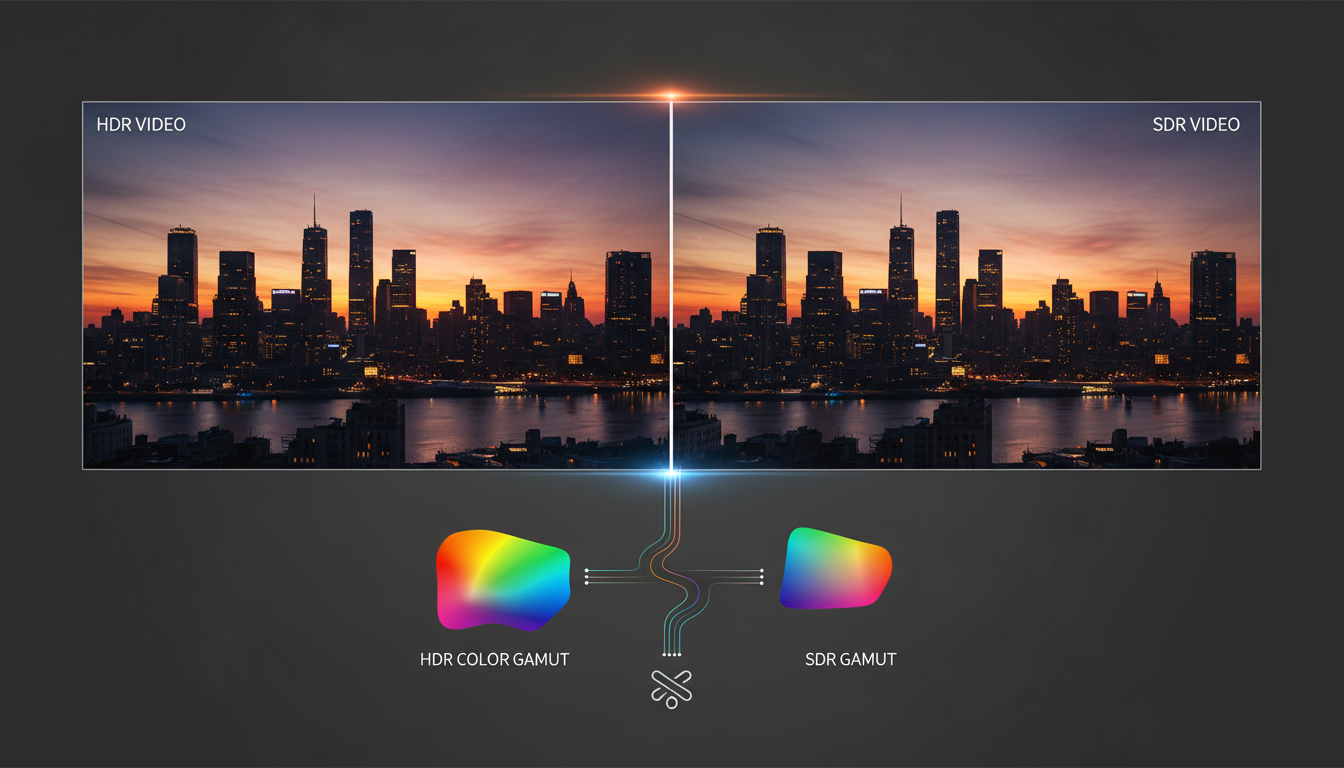
When you think about improving your stream's video quality, the first thing that probably comes to mind is resolution—720p, 1080p, 4K. But resolution is only part of the picture. The next frontier in creating a truly immersive and professional-looking broadcast lies in color and light. This is where the concepts of Standard Dynamic Range (SDR) and High Dynamic Range (HDR) come into play.
Understanding the difference between SDR and HDR is crucial for any modern broadcaster, from a community radio DJ adding a video feed to a church streaming its services in high fidelity. This guide will demystify these technologies, helping you decide which is right for your station and how Shoutcast Net provides the powerful, flexible infrastructure to deliver it.
What is SDR (Standard Dynamic Range)?
Standard Dynamic Range (SDR) is the video standard we've all been using for decades. It's the technology behind traditional television broadcasts, DVDs, and the majority of video content you see online today. Think of it as the default, the universal language of video that every screen and device understands without any special effort.
SDR was designed around the limitations of older display technology, specifically Cathode Ray Tube (CRT) TVs. Its specifications define how much color information and brightness variation a video signal can contain.
The Technical DNA of SDR
- Color Depth: SDR typically uses an 8-bit color depth. This might sound technical, but it simply means that for each of the three primary colors (red, green, and blue), there are 256 (2^8) possible shades. When you combine them, you get a total of approximately 16.7 million possible colors. While that sounds like a lot, it has limitations when displaying very subtle gradients, which can sometimes result in "color banding."
- Color Gamut: SDR uses a color gamut called Rec. 709. A gamut is essentially the specific palette of colors that a standard can reproduce. Rec. 709 is a well-established standard but covers only a fraction of the colors the human eye can actually perceive. It's like working with a good-sized box of crayons—you can create a colorful picture, but many of the most vibrant, saturated tones found in the real world are simply not in the box.
- Luminance: This refers to brightness. SDR content is mastered for a peak brightness of about 100 nits. This means the brightest parts of the image (like a lightbulb or the sun) are relatively muted compared to how they appear in reality. Likewise, the darkest parts of the image can lack detail, often appearing as a uniform black or dark gray.
For many broadcasters, especially those focused on audio like radio stations, podcasters, or school radio, SDR is more than sufficient. It's reliable, universally compatible, and requires less bandwidth, making it an efficient choice. When your primary content is audio, the video is often secondary—a webcam, a logo, or a simple studio shot. In these cases, the added complexity of HDR offers little practical benefit.
SDR's greatest strength is its universal compatibility. You never have to worry if your viewers can see your stream properly. Every phone, tablet, computer, and TV made in the last 20 years can display SDR video perfectly. If your goal is to reach the widest possible audience with maximum reliability, SDR is the safest and most efficient choice. Shoutcast Net's robust network is optimized to deliver high-quality SDR streams with rock-solid stability and our included AutoDJ feature is a perfect companion for audio-first SDR broadcasts.
What is HDR (High Dynamic Range)?
High Dynamic Range (HDR) is a massive leap forward in video technology, designed to create images that are far more realistic, vibrant, and impactful. It dramatically expands the two most important aspects of a visual image: the range of colors (color gamut) and the range between the darkest and brightest parts (dynamic range).
If SDR is a standard box of crayons, HDR is a professional artist's complete collection of pencils, paints, and pastels. It gives you the tools to reproduce images with a depth, richness, and realism that SDR simply cannot match. The result is a picture that looks less like a screen and more like a window into the real world.
The Power of HDR Explained
- Color Depth: HDR uses a minimum of 10-bit color depth, and sometimes even 12-bit. 10-bit color provides 1,024 (2^10) shades for each primary color, resulting in over 1 billion possible colors. This sixty-four-fold increase over SDR eliminates color banding and allows for incredibly smooth, lifelike gradients. You can see the subtle shifts in a sunset or the intricate color variations on a flower petal.
- Color Gamut: HDR utilizes a much wider color gamut, most commonly Rec. 2020 (also known as BT.2020). This gamut covers a significantly larger portion of the colors visible to the human eye, including deeper reds, more vibrant greens, and richer blues that are impossible to display with SDR's Rec. 709.
- Luminance: This is where HDR truly shines. Instead of being limited to 100 nits, HDR content can be mastered for peak brightness levels of 1,000 nits, 4,000 nits, or even higher. This allows for specular highlights—the glint of sunlight off water, the bright filament of a lightbulb, or reflections on metal—to appear incredibly bright and realistic. At the same time, HDR maintains deep, detailed blacks, so you can see texture and information in the shadows instead of a murky patch of darkness.
It's important to note there are several competing HDR formats, such as HDR10 (the open standard), HDR10+ (adds dynamic metadata), Dolby Vision (a proprietary format with dynamic metadata), and HLG (Hybrid Log-Gamma, used for broadcasting). For most online streaming, HDR10 is the most common and widely supported format.
A common misconception is that HDR just makes the entire picture brighter. In reality, its power lies in the *contrast* and *detail*. An HDR image uses its expanded brightness range to create a greater sense of depth. A dark scene in a movie can have a single, intensely bright flashlight beam cutting through the darkness, something that would look flat and washed out in SDR. It's this ability to show extreme light and dark in the same frame that makes HDR so compelling.
Key Differences: SDR vs. HDR Comparison Table
To make the differences clear, let's break them down side-by-side. This table highlights the core technical and practical distinctions between the two standards.
| Feature | SDR (Standard Dynamic Range) | HDR (High Dynamic Range) |
|---|---|---|
| Color Depth | 8-bit (16.7 million colors) | 10-bit or 12-bit (Over 1 billion colors) |
| Color Gamut | Rec. 709 (Limited color palette) | Rec. 2020 (Wide, lifelike color palette) |
| Peak Brightness (Luminance) | Mastered to ~100 nits | Mastered to 1,000 - 10,000 nits |
| Contrast Ratio | Lower; less detail in shadows and highlights | Vastly higher; deep blacks and brilliant highlights in the same scene |
| Bandwidth Requirement | Standard (e.g., 4-6 Mbps for 1080p) | Higher (Approx. 20-40% more than SDR for same resolution) |
| Hardware Compatibility | Universal: Works on all displays | Requires HDR-capable camera, encoder, streaming service, and display |
| Ideal Use Case | Audio-first broadcasts, maximum compatibility, lower bandwidth situations | Premium video content, cinematic experiences, visually rich live events |
As the table shows, HDR is superior in every visual metric, but that superiority comes at the cost of higher bandwidth and stricter hardware requirements. This trade-off is the central question when deciding which technology is right for your broadcast.
Do You Need HDR for Your Stream?
This is the most important question. The answer depends entirely on your content, your audience, and your goals. Let's break it down for our typical broadcasters.
For Radio DJs, Music Streamers, and Podcasters
The short answer: No, you almost certainly do not need HDR. Your audience is tuning in for the audio. The video component, if one exists, is supplementary. It might be a static album cover, a simple logo animation, or a single webcam shot of the host. In these scenarios:
- No Visual Benefit: HDR's advantages in color and light won't be noticeable or impactful on this type of content.
- Increased Complexity: You would need an HDR camera and encoder setup for no tangible gain.
- Wasted Bandwidth: You would be using more of your and your viewers' bandwidth for a feature they won't appreciate.
For these use cases, a high-quality audio stream paired with a reliable 720p or 1080p SDR video stream is the perfect combination. It's efficient, cost-effective, and compatible with everyone. Features like Shoutcast Net's powerful AutoDJ are far more valuable, allowing you to schedule and automate your audio broadcast 24/7.
For Church Broadcasters and School Radio/TV Stations
The answer here is: Maybe. It depends on the production value.
- If your stream is primarily a single, locked-off camera on a speaker at a podium, SDR is perfectly adequate and the most practical choice.
- However, if your church service features beautiful stained-glass windows with sunlight streaming through, a dynamic musical performance with stage lighting, or detailed architectural elements, HDR can make a world of difference. It can capture the atmosphere and visual splendor of the event in a way that SDR cannot, making remote viewers feel like they are truly there. The same applies to a school's theater production or a well-lit TV studio broadcast.
For Live Event Streamers and Pro Video Creators
The answer is: Yes, you should strongly consider it. If your brand is built on delivering a premium, high-fidelity visual experience—whether it's a music festival, a professional sports event, a cinematic short film, or a high-end product launch—HDR is your key to standing out. It signals a commitment to quality and provides a "wow" factor that sets you apart from the sea of standard SDR streams. For this audience, the extra effort is well worth the result.
Unlike legacy platforms that might have rigid technical limitations, Shoutcast Net is built for flexibility. Our modern infrastructure handles both SDR and HDR with ease. You can start with SDR and, as your production grows, switch to HDR without changing providers. We believe in empowering creators, not limiting them. While platforms like Wowza charge you more for every viewer and every hour, leading to unpredictable costs, Shoutcast Net offers simple, flat-rate plans with up to 1,000 listeners. This means you can stream in the quality you choose without being penalized for success. Start your 7 days trial and see the difference.
Hardware and Bandwidth Requirements for HDR
Streaming in HDR isn't as simple as flipping a switch. It requires a complete "chain" of HDR-compatible components from capture to playback. If any link in this chain is not HDR-ready, the effect will be lost.
1. HDR Capture Source
Your journey begins with a camera that can capture in HDR. Many modern devices can do this, including:
- Smartphones: Higher-end iPhones (12 Pro and newer) and many flagship Android phones can record in Dolby Vision or HDR10.
- Mirrorless/DSLR Cameras: Most modern prosumer and professional cameras from Sony, Canon, Panasonic, and Blackmagic Design can shoot in 10-bit "Log" profiles, which are designed to be graded and converted into HDR.
- Professional Camcorders & Cinema Cameras: These are designed from the ground up for HDR workflows.
2. HDR Encoding
The raw HDR video from your camera must be encoded for streaming. This is typically done with software like OBS Studio or a dedicated hardware encoder. The key is to use the right settings.
- Codec: You must use a modern codec. While AVC (H.264) can technically carry HDR, it's very inefficient. HEVC (H.265) is the standard and highly recommended codec for HDR streaming, as it provides better quality at a lower bitrate.
- Color Settings: You'll need to configure your encoder for a 10-bit color format (like P010 in OBS) and the correct HDR color space (Rec. 2100 PQ or HLG).
# Sample OBS Studio Advanced Settings for HDR
[Advanced]
ColorFormat=P010
ColorSpace=Rec. 2100 (PQ)
ColorRange=Full
SDRWhiteLevel=300
HDRNominalPeakLevel=1000
3. HDR-Capable Streaming Platform
Your streaming server must be able to ingest and deliver an HDR signal with all its metadata intact. This is where many older platforms, especially legacy Shoutcast audio servers, fall short. Shoutcast Net's modern video cloud is fully equipped to handle HDR. Our platform is protocol-agnostic, meaning we can process **any stream protocols to any stream protocols (RTMP, RTSP, WebRTC, SRT, etc)**. This ensures that whether you send us an SRT stream with HDR metadata from OBS or an RTMP feed from a hardware encoder, we can process and deliver it flawlessly.
4. Sufficient Upload Bandwidth
HDR video contains more information, which means it requires a higher bitrate. As a general rule, plan for about 20-40% more upload bandwidth for an HDR stream compared to an SDR stream of the same resolution and framerate. For example:
- 1080p60 SDR Stream: ~6,000 Kbps (6 Mbps)
- 1080p60 HDR Stream: ~8,000 - 9,000 Kbps (8-9 Mbps)
5. HDR Playback Device
Finally, your viewer needs an HDR-compatible display to see the full effect. This includes most modern 4K TVs, many computer monitors (look for DisplayHDR 400/600/1000 certification), and recent high-end smartphones and tablets. If a viewer is on an SDR screen, the streaming service should ideally "tonemap" the HDR signal down to SDR. Shoutcast Net's player handles this to ensure the best possible picture for every viewer, regardless of their device.
Before a major live event, it's critical to test your entire HDR workflow from end to end. Record a short clip with your HDR camera, run it through your encoder with HDR settings, stream it to your Shoutcast Net server, and watch it on a known-good HDR display. This will confirm that all metadata is being passed correctly and that the final image looks as you expect. This simple test can save you from a major headache during a live broadcast.
How to Stream HDR with Shoutcast Net
Ready to start streaming in stunning HDR? Shoutcast Net makes it simple. Our platform is designed to let you **stream from any device to any device**, providing the power of professional broadcasting with the simplicity our users love. Here’s how to do it.
Step 1: Get Your Shoutcast Net Video Streaming Server
If you haven't already, sign up for one of our video streaming plans. With prices starting at a fraction of the cost of competitors like Wowza and offering a risk-free 7 days trial, getting started is easy. All our plans include 99.9% uptime, SSL streaming for security, and crucially, up to 1,000 listeners with flat-rate billing. You can grow your audience without worrying about surprise overage charges.
Step 2: Configure Your Encoder (OBS Studio Example)
Open OBS Studio and configure it for an HDR broadcast. This is the most technical step, but it's straightforward.
- Go to Settings > Video and set your Base and Output Resolution (e.g., 1920x1080) and Framerate (e.g., 60).
- Go to Settings > Advanced.
- Under the "Video" section, change Color Format to P010.
- Change Color Space to Rec. 2100 (PQ).
- Leave Color Range on Full.
- Go to Settings > Output. Set Output Mode to "Advanced".
- On the "Streaming" tab, select your Video Encoder. Choose an HEVC (H.265) option (e.g., NVIDIA NVENC HEVC or AMD HW H.265).
- Set your Bitrate. For 1080p60 HDR, a good starting point is 8000 Kbps.
- Ensure Rate Control is set to CBR (Constant Bitrate).
Step 3: Connect to Your Shoutcast Net Ingest Server
In your Shoutcast Net control panel, you'll find your unique server URL and stream key. For HDR, we highly recommend using the SRT protocol if your encoder supports it, as it's more reliable over unstable internet connections, but RTMP/RTMPS will also work.
In OBS, go to Settings > Stream. Select "Custom" for the service, and paste in the Server URL and Stream Key provided by Shoutcast Net. Click Apply and OK.
Step 4: Go Live and Restream Everywhere!
Once you've set up your scenes in OBS, simply click "Start Streaming". Your high-quality HDR stream is now being sent to our servers. From there, you can use our powerful built-in tools to Restream to Facebook, Twitch, YouTube, and other platforms simultaneously. We take your single high-bitrate HDR source and transcode it to the optimal format for each destination, saving you massive amounts of CPU power and upload bandwidth.
Your viewers can watch directly on the secure, ad-free player page we provide, or you can embed the player on your own website. And with our **very low latency 3 sec** streaming technology, your broadcast will be incredibly responsive and interactive.
Streaming HDR directly to platforms like YouTube can be complex. A much easier workflow is to send your primary HDR stream to Shoutcast Net, and let us handle the rest. You get a pristine HDR master stream on your own website player, and we automatically send perfectly optimized SDR versions to social media platforms that may have stricter requirements or don't fully support HDR ingest. It’s the best of both worlds, all managed from one simple control panel. Check out our video hosting plans to learn more.
Ready to Experience the Future of Streaming?
Whether you need the universal compatibility of SDR or the stunning quality of HDR, Shoutcast Net has the tools, power, and pricing to make your broadcast a success.
Start Your 7-Day Free Trial Today