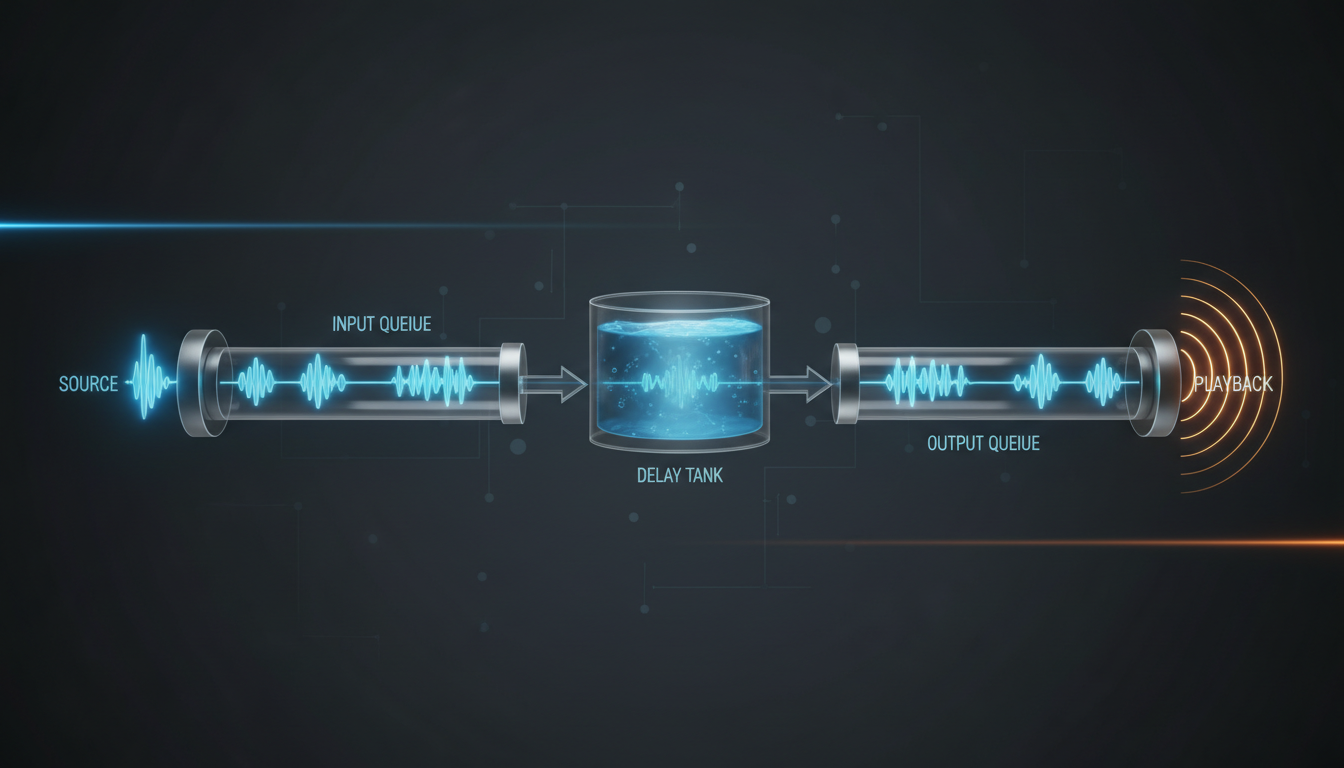
What is Audio Latency and Why Does It Happen?
Ever notice that slight delay when a radio host takes a call, or when you're watching a live event stream and your friend in the stadium texts you about a goal seconds before you see it? That delay is called latency. In the world of audio streaming, latency is the time it takes for an audio signal to travel from its source (your microphone) to its destination (your listener's ears).
It's a common misconception that latency is a bug or a sign of a poor connection. While a bad connection can certainly make it worse, a certain amount of latency is an unavoidable physical and digital reality of broadcasting over the internet. Think of it as a journey with several stops. Your audio doesn't just magically appear on your listener's device; it travels a complex path:
- Source: Your microphone captures the sound.
- Encoding: Your computer software (like OBS, BUTT, or RadioBOSS) compresses the audio into a streamable format (like MP3 or AAC).
- Transit (Ingest): The encoded audio travels over the internet from your location to our streaming server.
- Server Processing: The Shoutcast Net server receives your stream, processes it, and prepares it for distribution to all your listeners.
- Transit (Egress): The stream is sent from our server across the internet to each individual listener.
- Player Buffering & Decoding: The listener's device (a web browser, mobile app, or smart speaker) receives the data, stores a small amount in a buffer, and decodes it back into audible sound.
Each of these steps, no matter how optimized, takes a small amount of time—measured in milliseconds. When you add them all up, you get your total end-to-end latency. The goal isn't to eliminate latency entirely (which is impossible), but to understand it, manage it, and minimize it to a level that's appropriate for your broadcast.
Pro Tip: A Simple Latency Test
Want a quick way to measure your stream's latency? Open your stream on a player and listen with headphones. At the same time, speak a specific word loudly into your broadcast microphone (e.g., "MARK"). The time between you saying "MARK" and hearing it in your headphones is your approximate end-to-end latency. It's not a scientific measurement, but it gives you a great real-world feel for the delay your listeners experience.
The Critical Role of Buffering in a Smooth Stream
If latency is the necessary delay, buffering is the secret sauce that ensures a smooth, uninterrupted listening experience. A buffer is a small portion of a device's memory where audio data is pre-loaded before it's played.
Imagine your audio stream is a river flowing to your listener's player, which is a water wheel. The internet is not a perfectly smooth canal; it's a natural river with varying currents, occasional logjams (congestion), and choppy water (jitter). If the water wheel was spun directly by this unpredictable river, it would speed up, slow down, and stop constantly.
The buffer acts like a reservoir built before the water wheel. The river fills the reservoir, and the water wheel draws a steady, consistent flow from the reservoir's output. This reservoir "buffers" the wheel from the river's inconsistencies. As long as the river, on average, provides enough water to keep the reservoir from running dry, the wheel spins smoothly.
In streaming, the buffer on the listener's player does the exact same thing. It downloads a few seconds of audio in advance, creating a cushion. If there's a momentary hiccup in the listener's Wi-Fi or a bit of network congestion, the player can keep playing audio from the buffer while it waits for the connection to stabilize.
[ BUFFER ]   [ PLAYHEAD ]
|=====|      |
|=====|=====>|
|=====|      |
[Audio data pre-loaded]

  - Network Fluctuation! -
[ BUFFER ]   [ PLAYHEAD ]
|===  |      |
|===  |=====>|
|===  |      |
[Buffer drains, but audio keeps playing]

  - Network Recovers -
[ BUFFER ]   [ PLAYHEAD ]
|=====|      |
|=====|=====>|
|=====|      |
[Buffer refills, no interruption for the listener]
This creates the fundamental trade-off of streaming:
- Larger Buffer: More protection against network issues, leading to a very stable stream. The downside is higher initial startup time and increased overall latency.
- Smaller Buffer: Less protection, making the stream more susceptible to stuttering or stopping. The upside is a faster start time and lower overall latency.
Finding the right balance is key. At Shoutcast Net, our infrastructure is designed to deliver data so consistently that players can use smaller, low-latency buffers without fear of interruption. We can achieve a **very low latency 3 sec** on our network, a perfect balance of speed and stability.
Pro Tip: Educate Your Listeners
Some advanced web players or mobile apps allow listeners to adjust their own buffer settings. If you're a DJ focused on low-latency for interactive shows, you might tell your listeners: "For the fastest response, try setting your player's buffer to 3-5 seconds. If you experience dropouts, increase it to 10-15 seconds for maximum stability." This empowers your audience to optimize their own experience.
Pinpointing the Sources: Encoder, Server, and Player Latency
To effectively minimize latency, you need to know where it's coming from. Let's break down the three main stages where delay is introduced into your stream.
1. Encoder Latency
This is the delay created on your own computer before the stream even leaves your studio.
- Processing Power: Your software needs CPU cycles to capture audio from your mixer or microphone, mix it with other sources (like music from your AutoDJ), and compress it in real-time. A slower or overloaded computer will take longer to perform this task, adding latency.
- Codec Complexity: Different audio codecs (e.g., MP3, AAC, Opus) have different computational requirements. More efficient, modern codecs can sometimes introduce a tiny bit more processing latency, though this is often offset by the smaller file sizes they produce, which travel faster over the network.
- Internal Buffers: The encoding software itself has small internal buffers to ensure a smooth handoff of data to your network card. These are usually not user-configurable but contribute a few milliseconds to the total.
2. Server & Network Latency
This is the "journey" phase. It's often the largest and most variable component of total latency.
- Ingest Path: The distance and quality of the internet connection between you and the streaming server. Sending a stream from New York to a Shoutcast Net server in New York will be faster than sending it to a server in Sydney. Your upload speed is critical here.
- Server Processing: This is where Shoutcast Net shines. Once your stream arrives, our servers instantly process it and make it available to your listeners. For more advanced users, our platform is capable of translating **any stream protocols to any stream protocols (RTMP, RTSP, WebRTC, SRT, etc)**. This means you could send us a high-quality video feed and we could output a low-latency audio-only stream, a standard web stream, and even **Restream to Facebook, Twitch, YouTube** simultaneously. This complex processing is handled with minimal latency on our optimized hardware.
- Egress Path: The journey from our server to your listener. We host our servers in premium data centers with high-speed connections to major internet backbones to ensure this path is as fast and direct as possible for listeners around the world.
3. Player Latency
This is the final delay introduced on the listener's end device.
- Player Buffer: As we discussed, this is the biggest factor on the listener side. Most web players default to a buffer of 10-30 seconds to prioritize stability over low latency.
- Decoding: The player has to decompress the MP3 or AAC audio back into raw sound waves. This is a very fast process on modern devices and adds negligible latency, but it's still part of the chain.
- Device/OS Buffers: The device's operating system (Windows, iOS, Android) has its own audio subsystem with tiny buffers that can add a few final milliseconds of delay before the sound comes out of the speakers.
Pro Tip: Use `traceroute` to Diagnose Network Path
If you suspect high latency is due to a poor network path between you and the server, you can use a command-line tool called `traceroute` (on Mac/Linux) or `tracert` (on Windows). Running `tracert your-server-address.com` will show you every "hop" your data takes to reach the server and the time each hop takes. High ping times on a specific hop can indicate a network problem outside of your or our control.
How to Configure Your Encoder for Lower Latency
While you can't control your listener's internet connection, you have significant control over your encoder settings. Optimizing these is one of the most effective ways to reduce your stream's overall latency. Let's look at some key settings available in popular broadcast software like RadioBOSS, BUTT, and OBS Studio.
Bitrate and Codec
Lowering your bitrate means you're sending less data, which can reduce network transit time. However, this comes at the cost of audio quality.
- For Music: 128kbps AAC or 192kbps MP3 is a good starting point for high-quality stereo. If latency is critical, you could experiment with 96kbps AAC, which often sounds better than 128kbps MP3.
- For Voice/Talk Radio: You can go much lower. 64kbps or even 48kbps AAC in mono can sound perfectly clear for spoken word content, significantly reducing the data load.
The codec choice matters. AAC (Advanced Audio Coding) is generally more efficient than MP3, meaning it provides better quality at a lower bitrate. For low latency streaming, AAC is often the preferred choice.
Encoder-Specific Settings
Many encoders don't expose deep latency controls, as they are often handled by the server and player. However, some advanced settings can have an impact. Here's a look at a hypothetical configuration panel, representing settings you might find.
[Streaming Configuration - BUTT Example]

Server Type: Shoutcast v2
Bitrate: 128 kbps
Format: AAC
Sample Rate: 44100 Hz

[Advanced Settings]

# This setting in some encoders controls the size of the data packet sent.
# Smaller packets can potentially reduce latency but may be less network-efficient.
# This is often not user-configurable.
Packet Size: 1400 bytes

# Reconnect settings don't affect latency, but are crucial for stream reliability.
Reconnect on disconnect: [X]
Reconnect Timeout: 5 seconds
The most important takeaway is to choose a reliable encoder, select an efficient codec like AAC, and pick the lowest bitrate that still meets your quality standards. A stable, consistent stream from your end is the first and most critical step to a low-latency broadcast. Remember, our platform is built to **stream from any device to any device**, so whether you're using a professional hardware encoder or a simple app on your phone, the principles are the same.
Pro Tip: Test, Don't Guess
Before you go live with new settings, always test them. Use the 7 days trial from Shoutcast Net to set up a test stream. Listen to it yourself on different devices (phone on cellular, laptop on Wi-Fi) and ask a friend in another location to listen as well. Start with standard settings (e.g., 128k AAC) and only make one change at a time to see its effect on quality and stability.
Shoutcast vs. Icecast: Which is Better for Latency?
When choosing a streaming server, the two most famous names are Shoutcast and Icecast. Both are excellent protocols that form the backbone of internet radio, and Shoutcast Net offers premium hosting for both. But when it comes to latency, are there any differences?
Historically, yes. The original Shoutcast v1 protocol had a design that could introduce extra latency. It worked by having the server buffer the entire "burst" of data from the encoder before passing it to listeners, adding a delay equal to the burst size.
Icecast was developed later with a more modern, pass-through architecture. It was designed to handle data more like a real-time pipe, which gave it a technical edge for low-latency applications. Modern Shoutcast v2 has largely closed this gap, adopting a similar architecture.
Today, on a highly optimized platform like Shoutcast Net, the practical latency difference between a Shoutcast hosting plan and an Icecast hosting plan is negligible for 99% of broadcasters. The server hardware, network routing, and player-side buffering have a much larger impact than the protocol choice itself.
| Feature | Shoutcast | Icecast | The Shoutcast Net Advantage |
|---|---|---|---|
| Core Architecture | Modern v2 is low-latency; legacy v1 can have higher latency. | Designed from the ground up for low-latency, real-time data flow. | We use the latest, most stable versions of both, configured for minimal latency. |
| Format Support | Primarily MP3 and AAC. | Supports a wider range of formats out-of-the-box (Ogg Vorbis, Opus, etc.). | Our platform handles transcoding, so you can send us nearly any format and we'll serve the right one to your listeners. |
| Mount Points | v2 supports multiple streams from one port. | The original and most flexible for running multiple streams (e.g., high/low bitrate) from a single server instance. | Our control panel makes managing multiple streams and mount points simple, regardless of the underlying protocol. |
| Practical Latency | Good. On our network, expect 3-10 seconds. | Slightly Better. Can sometimes achieve slightly lower latency, closer to the 3-5 second range. | Best. The choice is yours, and we guarantee exceptional performance on either. Our **very low latency 3 sec** target is achievable with both. |
Pro Tip: Our Recommendation
For new stations where every millisecond counts (e.g., live sports commentary, interactive DJ shows), we recommend starting with an Icecast plan. Its architecture has a slight theoretical edge. For established broadcasters or those who prefer the Shoutcast ecosystem and its directories, our Shoutcast plans are rock-solid and offer fantastic low-latency performance. You can't go wrong with either on our network.
Why Shoutcast Net Beats Wowza on Price and Performance
When you're serious about streaming, you might look beyond basic servers and encounter enterprise platforms like Wowza. While powerful, these solutions are often overkill, incredibly expensive, and complex for the vast majority of internet radio broadcasters. Let's break down why Shoutcast Net provides superior value and performance for your needs.
The Problem with "Enterprise" and DIY Solutions
Wowza's Billing Nightmare: Wowza and similar enterprise platforms often use a metered billing model. You pay per hour of streaming, per GB of bandwidth, and sometimes even per listener. This creates unpredictable, often skyrocketing costs. A successful broadcast that goes viral could bankrupt you! Their target market is massive corporations, and their pricing reflects that.
The Limitations of Legacy Shoutcast: On the other end of the spectrum, running your own free, open-source Shoutcast server seems appealing. But you're responsible for everything: server hardware, colocation, bandwidth costs, security updates, 99.9% uptime, and technical support. It's a full-time job and lacks crucial modern features like a powerful AutoDJ, SSL streaming, or easy multi-protocol support.
The Shoutcast Net Advantage: Pro Power, Passionate Price
We built Shoutcast Net to bridge this gap, offering the power of an enterprise platform with the simplicity and affordability that independent broadcasters need.
- Predictable, Flat-Rate Pricing: Our plans start at just $4/month. We offer up to 1,000 listeners and generous bandwidth with no surprise fees. You can budget with confidence, knowing your bill won't change no matter how successful you are.
- Optimized Low-Latency Performance: We've invested heavily in a global network and server architecture specifically for audio streaming. This allows us to deliver on our promise of **very low latency 3 sec** performance, something that's difficult and expensive to achieve with a general-purpose platform like Wowza.
- Unmatched Protocol Flexibility: This is where we truly outshine the competition. Our advanced infrastructure can ingest and output **any stream protocols to any stream protocols (RTMP, RTSP, WebRTC, SRT, etc)**. This means you can send a professional RTMP stream from OBS and we can deliver it as a standard Shoutcast/Icecast stream, a low-latency WebRTC stream for web players, and even **Restream to Facebook, Twitch, YouTube**—all from one source. This level of flexibility is enterprise-grade, but included in our affordable plans.
- Feature-Rich Platform: All our plans come with the tools you need to succeed: a powerful web-based **AutoDJ** with a massive storage library, free SSL streaming for secure HTTPS playback, detailed analytics, and our famous 99.9% uptime guarantee. We empower you to **stream from any device to any device**.
- Try Before You Buy: We're so confident in our platform that we invite you to put it to the test. Every plan comes with a no-obligation **7 days trial**. See for yourself how easy it is to set up and how great the performance is. Start your free trial today!
The Bottom Line
Don't pay enterprise prices for your passion project, and don't settle for the limitations of a DIY server. Shoutcast Net provides the best of both worlds: professional-grade performance, cutting-edge features like multi-protocol support and low latency, and a simple, affordable flat-rate price that lets you focus on what you do best—creating great content.
View Our Up-to-1,000-Listener Plans