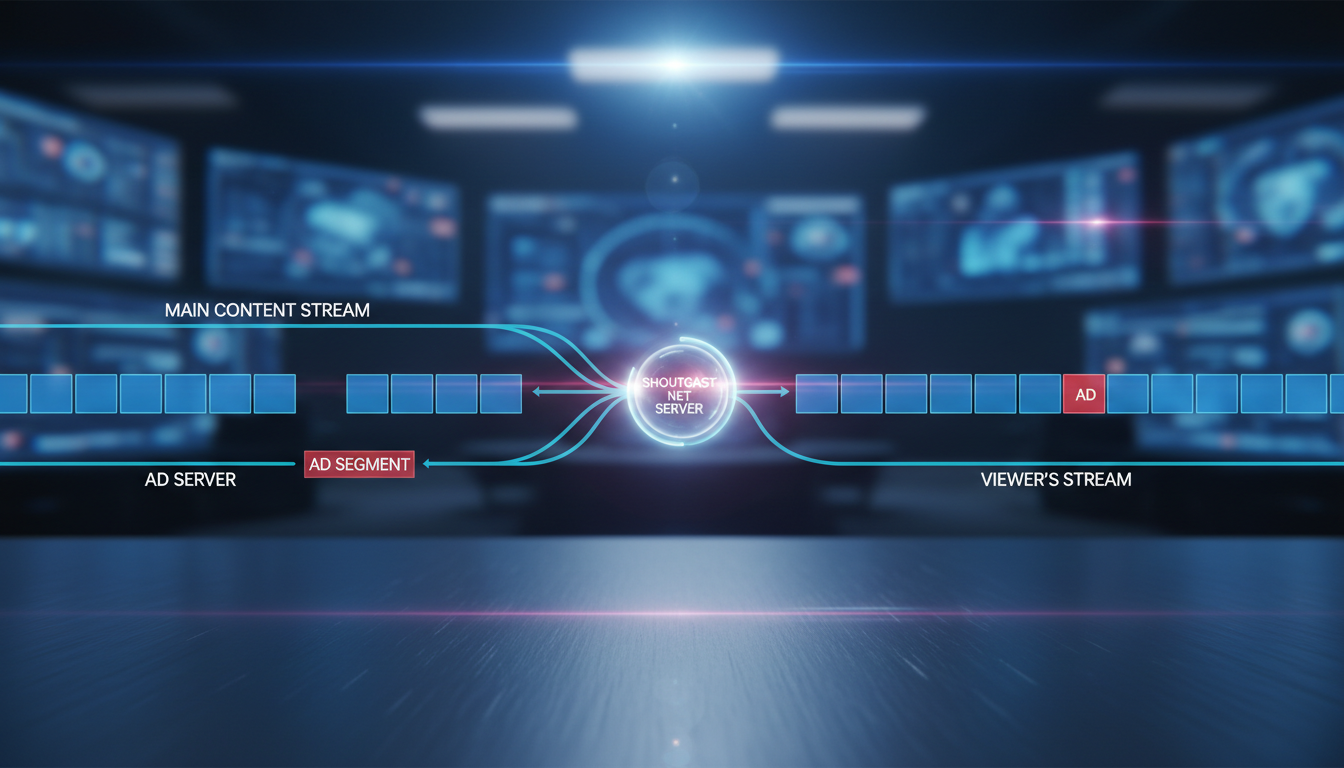
What is Dynamic Ad Insertion (DAI)?
In the world of internet radio and audio streaming, Dynamic Ad Insertion (DAI) is a revolutionary technology that allows broadcasters to insert ads into their audio streams in real-time. Unlike traditional "baked-in" ads, which are permanently part of the audio file like in a pre-recorded podcast, DAI stitches advertisements into your live or automated stream on the fly.
Think of it like a live TV commercial break, but for your internet radio station. When it's time for an ad, the streaming server seamlessly swaps your main content (music, talk show, sermon) with an ad creative, and then swaps it back when the ad is over. For the listener, it's a single, uninterrupted audio experience.
This approach offers several powerful advantages over static, baked-in ads:
- Personalization & Targeting: While complex targeting is a high-end feature, even basic DAI allows you to serve different ads based on the time of day, day of the week, or specific programming blocks. You can run a coffee shop ad in the morning and a local restaurant ad in the evening.
- Increased Monetization: With DAI, you're not limited to the ads you recorded weeks ago. You can sell ad slots dynamically, update campaigns instantly, and run promotions for timely events, maximizing your revenue potential.
- Fresh & Relevant Content: Are your baked-in ads promoting an event that happened last month? DAI ensures your ad content is always current, improving the listener experience and delivering better results for your advertisers.
- Operational Efficiency: No more re-rendering and re-uploading massive audio files just to change a single 30-second ad spot. With a system like Shoutcast Net's AutoDJ, you simply manage your ad files and playlists.
For everyone from a hobbyist radio DJ to a growing church broadcaster or a school radio station, DAI transforms your stream from a simple broadcast into a professional, monetizable media platform.
Pro Tip: Start Monetizing Early
Don't wait until you have a massive audience to think about monetization. Implementing a DAI strategy early, even with just a few house ads promoting your own website or social media, builds the foundation for future growth. Shoutcast Net makes it easy to start, with plans beginning at just $4/month and a 7 days trial to test all features.
Server-Side (SSAI) vs. Client-Side (CSAI): What's Best for Audio?
When implementing DAI, there are two primary technical approaches: Server-Side Ad Insertion (SSAI) and Client-Side Ad Insertion (CSAI). Understanding the difference is crucial for choosing the right strategy for your audio stream.
Server-Side Ad Insertion (SSAI)
Also known as "ad stitching," SSAI is a process where the ad content is inserted directly into the main audio stream on the server before it's delivered to the listener. The server receives a request for the stream, identifies an ad break, fetches the ad, and "stitches" it into the audio feed. The listener's player receives one continuous, unified stream. Shoutcast Net's AutoDJ feature is a powerful and accessible form of SSAI.
Client-Side Ad Insertion (CSAI)
With CSAI, the responsibility for fetching and playing ads falls on the listener's device (the "client")—their web browser, mobile app, or smart speaker. The client plays the main content, receives a signal to pause, makes a separate request to an ad server, plays the ad, and then resumes the main content. This is common in on-demand video platforms like YouTube.
Comparison: SSAI vs. CSAI for Audio Streaming
For continuous audio streaming like internet radio, the winner is clear. Here’s a breakdown:
| Feature | SSAI (Server-Side Stitching) | CSAI (Client-Side) |
|---|---|---|
| Listener Experience | Seamless and smooth. No buffering or jarring transitions between content and ads. Just like traditional radio. | Can cause buffering, delays, or volume mismatches as the player switches between different sources. |
| Ad Blocker Vulnerability | Highly resistant. Because the ad is part of the core stream, ad blockers cannot distinguish it from the main content. | Extremely vulnerable. Ad blockers easily detect and block the separate calls to ad servers, resulting in lost revenue. |
| Device Compatibility | Universal. Any player that can play a standard MP3 or AAC stream can play an SSAI stream. You can truly stream from any device to any device. | Requires a "smart" player with a specific ad-handling SDK. Incompatible with many simple players and older devices. |
| Technical Complexity | Handled entirely by a powerful server platform like Shoutcast Net. Simple for the broadcaster to manage. | Complex. Requires development of player-side logic, SDK integration, and managing multiple stream sources. |
| Measurement | Server-side logs provide impression data. Conversions are best tracked via promo codes or unique URLs. | Can offer more granular client-side metrics (viewability, clicks), but only if the ad isn't blocked. |
For radio broadcasters, music streamers, and podcasters, SSAI is overwhelmingly the superior choice. It provides a professional, uninterrupted listening experience and, most importantly, bypasses the ad blockers that decimate revenue from CSAI implementations.
Pro Tip: Prioritize the Listener Experience
A choppy, buffering stream is the fastest way to lose a listener. SSAI ensures your ad breaks are as smooth as your content transitions. This reliability is a core principle of our platform, which is why we guarantee 99.9% uptime and provide robust features like the AutoDJ to facilitate a world-class SSAI experience.
The Technical Workflow of DAI in a Shoutcast Stream
Let's dive deep into the mechanics of how Server-Side Ad Insertion works within the Shoutcast Net ecosystem. While the high-end video world uses complex markers like SCTE-35, the beauty of our system is its powerful simplicity, which achieves the same seamless result for audio.
The entire process is orchestrated by our AutoDJ, acting as the brain of your station. Here is the step-by-step workflow:
 Listener Player  <-- [Step 5: Unified MP3/AAC Stream] -- Shoutcast Net Server
                                                                   ^
                                                                   |
+------------------------------------------------------------------+
| [Step 4: STITCHING]                                              |
| The AutoDJ seamlessly combines the chosen ad file (ad.mp3)       |
| with the main content stream (song2.mp3).                        |
|                                                                  |
|   ( ... song1.mp3 ends ... | ad.mp3 | ... song2.mp3 begins ... )  |
|                                                                  |
+------------------------------------------------------------------+
                                     ^
                                     |
+------------------------------------+--------------------------------+
| [Step 2: AD REQUEST]               | [Step 3: AD DECISION]          |
| The AutoDJ playlist scheduler      | Based on the schedule, the     |
| identifies a scheduled ad break.   | AutoDJ selects an ad from the  |
| "Time for a 60s commercial!"       | 'Commercials' playlist.        |
|                                    | "Playing 'ad_campaign_X.mp3'." |
+------------------------------------+--------------------------------+
                  ^
                  |
+------------------------------------------------------------------+
| [Step 1: CUE POINT]                                              |
| The AutoDJ finishes playing a track (e.g., song1.mp3) from       |
| your main music playlist. This creates a natural transition      |
| point for an ad break.                                           |
+------------------------------------------------------------------+
Step 1: The Cue Point
In our system, a "cue point" isn't a complex metadata marker; it's simply the natural end of a media file being played by the AutoDJ. When one song finishes, a potential slot for an ad opens up. The scheduler can also be configured to interrupt a playlist at a specific time or after a certain number of tracks, creating a cue point on demand.
Step 2: The Ad Request
This step is managed by the AutoDJ's powerful scheduling feature. You create rules that tell the system when to play ads. For example, you can set a rule to "Play the 'Top of Hour Ads' playlist every hour, at 0 minutes past the hour." When that time arrives, the scheduler triggers an "ad request."
Step 3: The Ad Decision
The "decision" is made based on your playlist configuration. If your 'Top of Hour Ads' playlist contains three different ad files and is set to shuffle, the AutoDJ will randomly pick one to play. This simple rotation ensures listeners don't hear the exact same ad every single hour. For more advanced logic, you can create multiple, time-specific playlists.
Step 4: The Stitching Process
This is the core of SSAI. The Shoutcast Net server takes the selected ad file (e.g., `local_pizzeria_ad.mp3`) and transcodes it on-the-fly to perfectly match the format and bitrate of your main stream (e.g., 128kbps MP3). It then stitches this ad audio directly into the outgoing stream. To the outside world, it's just one continuous flow of audio data. This robust server infrastructure is what sets us apart from basic, legacy Shoutcast servers that lack these capabilities.
Step 5: Unified Playback
The listener's player—be it a web player, a mobile app, or a hardware internet radio—receives a single, unbroken stream. The player has no idea that an ad was dynamically inserted. It just plays the audio it's given. This is why SSAI is so powerful and universally compatible. It works everywhere.
Pro Tip: Standardize Your Ad Audio
For the smoothest listener experience, ensure all your ad audio files are normalized to the same volume level as your main content. A sudden loud or quiet ad can be jarring. Most audio editing software has a "Normalize" or "Loudness Normalization" function. Export your ads as high-quality MP3s and let the AutoDJ handle the rest.
How to Set Up DAI with Shoutcast Net's AutoDJ
One of the biggest advantages of Shoutcast Net hosting is that you don't need to be a broadcast engineer to implement a professional DAI strategy. Our intuitive AutoDJ control panel makes it a straightforward process. Here’s how you can get your first ad campaign live in minutes.
Step 1: Prepare and Upload Your Ad Creatives
First, get your advertisements ready. These should be standard audio files, preferably MP3 format. As mentioned before, it's best practice to normalize their volume to match your music or talk content. Once ready, log into your Shoutcast Net control panel, navigate to the AutoDJ, and use the File Manager to upload your ad files. For organization, we recommend creating a dedicated folder named "Advertisements."
Step 2: Create Your Ad Playlists
In the AutoDJ, playlists are the heart of your programming. You'll create specific playlists just for your ads. Go to the "Playlists" section and create a new one. You might name it "General Rotation Ads" or "Top of Hour Commercials."
Drag your uploaded ad files from the media library into this new playlist. You can add one or many ads. If you add multiple, the AutoDJ can be set to play them in order or shuffle them for variety.
Step 3: Schedule Your Ad Breaks
This is where the "dynamic" magic happens. Go to the AutoDJ's "Scheduler." Here you can create events to trigger your ad playlists. You have several powerful options:
- Time-Based Event: This is the most common for radio-style ad breaks. You can schedule your "Top of Hour Commercials" playlist to play every day at a specific time, like 14:00.
- Interval Event: You can schedule a playlist to play after a certain number of songs or after a certain number of minutes. For example, "Play the 'Short Promo' playlist every 5 songs." This keeps your ad delivery consistent regardless of song length.
- Immediate Event: You can also manually trigger a playlist to play immediately, useful for live-read situations or special announcements.
Here's what a conceptual scheduled event might look like in the control panel:
EVENT TYPE: Time-Based
SCHEDULED TIME: Every day, at 0 minutes past the hour (e.g., 1:00, 2:00, 3:00)
PLAYLIST TO PLAY: 'Top_Of_Hour_Commercials.m3u'
PLAYBACK BEHAVIOR: Interrupt and resume main playlist
Once you save the schedule and your AutoDJ is running, the system will automatically handle the ad insertion for you, 24/7. It's a true "set it and forget it" solution that provides incredible value, far beyond what's possible with legacy Shoutcast or expensive competitors. Our platform's flexibility also supports advanced use cases, allowing you to manage **any stream protocols to any stream protocols (RTMP, RTSP, WebRTC, SRT, etc)** if you're bridging from other sources.
Pro Tip: Use Weighted Playlists for Ad Rotation
Want to play a new advertiser's ad more frequently than an older one? Our AutoDJ supports weighted playlists. You can set a "weight" for each track (ad) in a playlist. A track with a weight of 10 will be chosen to play 10 times more often than a track with a weight of 1. This gives you fine-grained control over ad frequency without complex scheduling. Try it yourself with our 7 days trial!
Why Flat-Rate Pricing Beats Per-Viewer Costs for DAI
Your monetization strategy is only as good as its profitability. When choosing a streaming provider, the pricing model is one of the most critical factors that will determine your success. This is where Shoutcast Net offers a decisive advantage over platforms like Wowza or other enterprise-grade CDNs.
The Problem: Punishing You for Growth
Many streaming providers, particularly those like Wowza, use a metered billing model. They charge you based on a combination of factors:
- Per-Viewer or Per-Listener Hours: You pay for every hour a person is tuned in.
- Bandwidth/Egress Data: You pay for every gigabyte of data that leaves their servers.
- Transcoding Hours: You pay for the server time used to process your stream.
This model is fundamentally hostile to broadcasters. As your station becomes more popular and your listenership grows, your bill explodes. Your success is punished with higher costs, which directly eats into the ad revenue you're working so hard to generate. It creates unpredictable monthly bills and makes it impossible to forecast your expenses.
The Solution: Predictable, Flat-Rate Power
Shoutcast Net was built for broadcasters. We use a simple, transparent, flat-rate pricing model. For a low monthly fee (starting at just $4/month), you get:
- Up to 1,000 Listeners & Unlimited Bandwidth.
- All-inclusive features like our powerful AutoDJ for SSAI.
- Free SSL Streaming (https://) for secure connections.
- 99.9% Uptime.
Let's look at a simple scenario. You run a popular station and have 500 listeners tuned in for an average of 3 hours per day.
| Provider | Pricing Model | Estimated Monthly Cost |
|---|---|---|
| Wowza | Metered (Pay-as-you-go for viewers & bandwidth) | $150 - $400+ |
| Shoutcast Net | Flat-Rate (Up to 1,000 Listeners & unlimited Bandwidth) | Starts at $4/month |
With Shoutcast Net, your costs are fixed and predictable. As you grow from 500 to 5,000 listeners, your hosting cost doesn't change. This means every new listener and every new ad campaign directly increases your profit margin. Our model is designed to fuel your growth, not penalize it.
Pro Tip: Calculate Your True ROI
When an advertiser pays you $100 for a campaign, your profit isn't $100. It's $100 minus your operational costs. With unpredictable metered billing, calculating your true Return on Investment (ROI) is a nightmare. With Shoutcast Net's fixed cost, it's simple. You know exactly what your hosting overhead is, allowing you to price your ad slots confidently and maximize profitability.
Measuring Ad Performance and ROI
Running ad campaigns is only half the battle; proving their effectiveness is what secures repeat business from advertisers and justifies your efforts. While the simple SSAI method used by our AutoDJ doesn't provide the granular, per-user tracking of complex (and easily blocked) CSAI systems, it enables highly effective and reliable measurement through proven, classic broadcasting techniques.
Leverage Your Listener Statistics
Your Shoutcast Net control panel provides comprehensive, real-time and historical statistics about your listenership. You can see:
- Peak listener counts and times.
- Average listening duration.
- Geographic location of your listeners.
- Player/User-Agent data.
This data provides powerful "impression" metrics. You can confidently tell an advertiser, "Your ad ran during our morning drive-time show, which consistently reaches 1,200 unique listeners." This is the foundational data for any ad performance report. Our platform's ability to **Restream to Facebook, Twitch, YouTube** simultaneously can also provide additional analytics from those platforms, giving you a more holistic view of your total reach.
The Power of Direct Response: Promo Codes and Vanity URLs
This is the most effective way to measure direct ROI for your advertisers. Work with them to create unique tracking mechanisms for the ads run on your station.
- Unique Discount Codes: In the ad creative, include a call-to-action like, "Enter code RADIO20 at checkout for 20% off!" The advertiser can then track exactly how many sales originated from your station.
- Vanity URLs: Use a specific URL in the ad read, such as "Visit JoesPizza.com/STREAM to see our specials." The advertiser can check their website analytics to see how much traffic that specific page received.
These methods provide undeniable proof of performance and are far more valuable to a local business advertiser than abstract metrics like "viewability."
Calculating Your Return on Investment (ROI)
With the data above, calculating your ROI becomes straightforward. The basic formula is:
ROI = ( (Revenue from Ads - Total Costs) / Total Costs ) * 100
Thanks to Shoutcast Net's flat-rate pricing, the "Total Costs" part of your equation is simple and predictable. It's your low monthly hosting fee plus any time you invested. This clarity allows you to demonstrate incredible value. If an advertiser pays you $200 and you can show they made $1000 in sales via a promo code, that's a fantastic return that will keep them coming back. Our platform's **very low latency 3 sec** streaming also ensures that your calls-to-action are heard by listeners almost instantly, which is critical for time-sensitive promotions.
Pro Tip: Create a Simple Advertiser Report
Go the extra mile for your advertisers. At the end of a campaign, send them a one-page PDF report. Include a screenshot of your listener stats during the times their ad ran, mention the total number of times the ad was played, and most importantly, include the results from their promo code or vanity URL. This professional touch builds trust and long-term partnerships. You can try all these features and see the stats for yourself with our risk-free 7 days trial.