Complete Guide: Configuring VirtualDJ for Live Audio Broadcasting
Our Low Latency Live Stream Server Is Best For Djs, Artists, Events, Sports, Gamings, Radio Stations, Tv Stations, Conferences, Training, Surveillance, Monitoring! Create A Radio Station Or Tv Station And Connect With Your Audience Anywhere, Anytime And On Any Device! We Designed Real Time Live Stream Server For Broadcasts Where Interactivity Is Essential! Sub One Second Live Streaming! Scale Up To A Million Viewers And Listeners Using Top Cloud Provider!
For good results please use our applications tried by many djs which can be downloaded here:
CLICK FOR DOWNLOAD
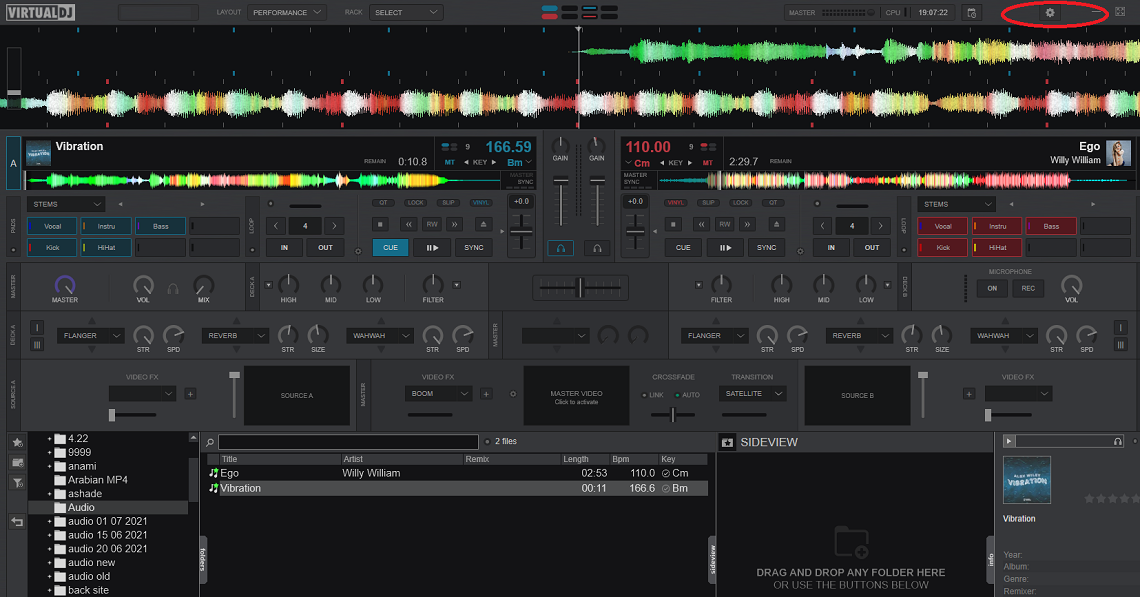
Start VirtualDJ on your computer and click on settings button
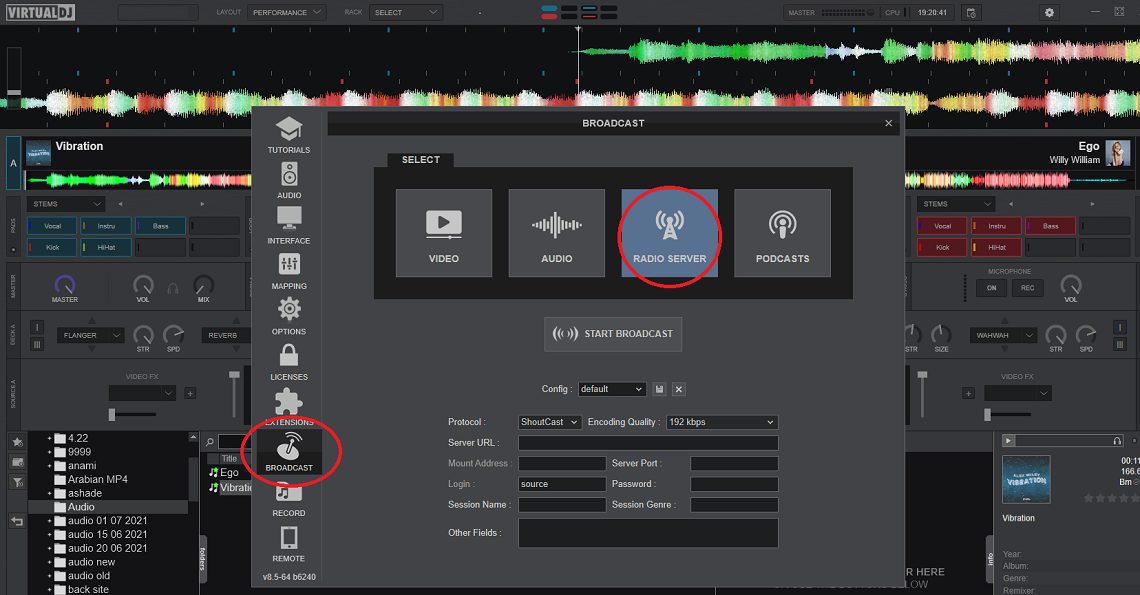
Click on broadcast and on radio server
GET YOUR FREE SERVER
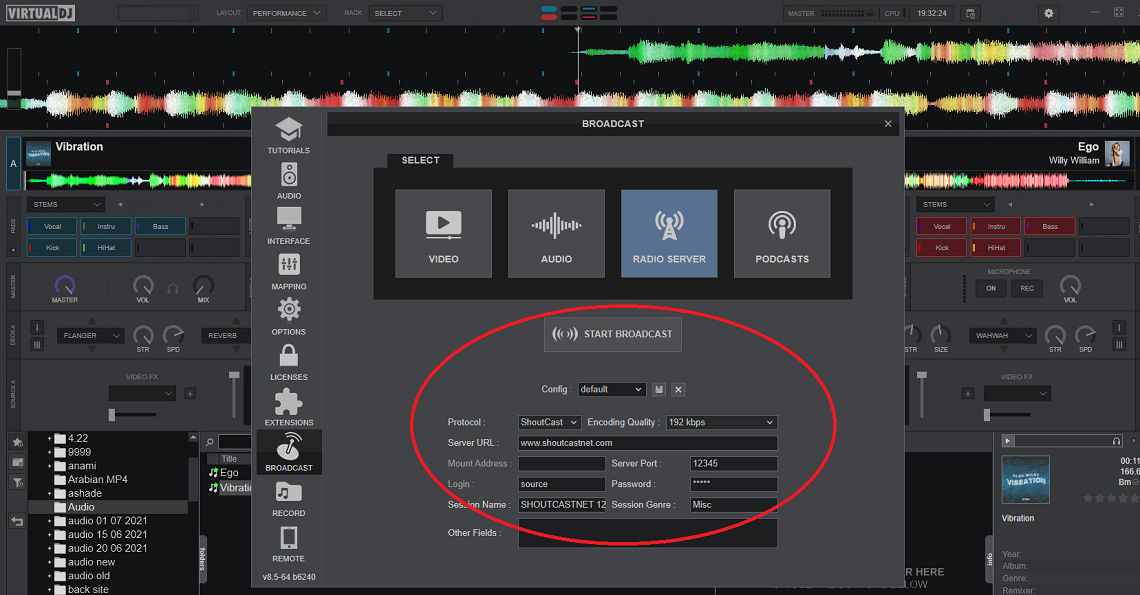
Configure your virtualdj application with data:
PROTOCOL: SHOUTCAST
ENCODING QUALITY: 128 - 320 kbps
SERVER URL: your server
MOUNT ADRESS: must be emty
SERVER PORT: your port
LOGIN: source
PASSWORD: your pass
Click on START BROADCAST and close the configuration window
GET YOUR FREE SERVER
VirtualDJ Broadcast Connection Errors & Solutions
VirtualDJ Can't Connect to Server
Error: "Broadcast connection failed" or "Unable to connect to streaming server"
Solutions:
- Protocol Selection: Ensure PROTOCOL is set to "SHOUTCAST" (not Icecast or other options)
- Server URL Format: Use only the hostname (e.g., stream.shoutcastnet.com) without "http://" or port numbers
- Empty Mount Address: The MOUNT ADDRESS field must be completely empty for Shoutcast servers
- Login Credentials: LOGIN should be "source" (exactly as shown, lowercase)
- Port Verification: Double-check you're using the streaming port from your control panel (not the listening port)
Authentication Error
Error: "Invalid password" or "Authentication failed"
Solutions:
- Password Copy-Paste: Copy your password directly from your Shoutcast.net control panel to avoid typos
- Special Characters: If password contains symbols (@, #, $, %), ensure VirtualDJ isn't auto-escaping them
- Reset Password: Generate a new streaming password in your account dashboard
- Case Sensitive: Passwords are case-sensitive - verify uppercase/lowercase letters match exactly
Broadcast Starts But No Audio
Problem: "START BROADCAST" button is active but listeners hear silence
Solutions:
- Master Output: Check that your master volume in VirtualDJ isn't muted or too low
- Sound Card Selection: Go to Settings > Audio Setup - ensure correct audio device is selected
- Encoding Quality: Set to minimum 128kbps - use our Bitrate Calculator for optimal settings
- Track Loading: Verify tracks are actually loaded and playing in the decks (not just in browser)
- Crossfader Position: Check crossfader isn't cutting off the active deck
Stream Disconnects During Performance
Problem: Broadcast drops randomly while DJing
Solutions:
- Stable Connection: Use wired Ethernet instead of WiFi for reliable streaming
- Lower Bitrate: If upload speed is limited, reduce encoding quality to 96kbps or 128kbps
- Close Other Apps: Stop bandwidth-heavy programs (torrents, cloud backups, video calls)
- Update VirtualDJ: Ensure you have the latest version from virtualdj.com
- Computer Performance: Close unnecessary background processes - VirtualDJ needs CPU for mixing and encoding
Windows 10/11 Performance Tips
Optimize VirtualDJ for Windows desktop streaming:
- Game Mode Off: Disable Windows Game Mode (Settings > Gaming) - it can interfere with audio encoding
- Power Plan: Set to "High Performance" in Windows Power Options
- Firewall Exception: Add VirtualDJ to Windows Defender Firewall allowed apps
- Audio Drivers: Update your sound card drivers from manufacturer's website
- ASIO Support: Consider using ASIO drivers for lower latency (advanced users)
Need 1-on-1 help with your VirtualDJ broadcast setup?
Chat with Support 24/7START YOUR FREE TRIAL NOW
Level up your VirtualDJ workflow
Need a written checklist plus pricing guidance? Read our SEO-ready blog companion, then explore the rest of the hard-coded tutorials in the Shoutcast Net How-To Library.