Facebook Live Broadcasting
Professional Facebook Live Streaming Beyond Platform Limits
Stream to Facebook Live with enhanced features: no 4-hour limit, automatic DVR recording, simulcast to your website + Facebook simultaneously, detailed analytics, and professional encoding. Better quality, more control.
- Unlimited broadcast duration (no 4-hour limit)
- Stream to Facebook + your website simultaneously
- Auto-record & publish to your video library
Why Use Professional Facebook Live Streaming?
While Facebook's native "Go Live" button works for casual mobile broadcasts, professional Facebook Live streaming uses external encoding software (OBS Studio, vMix, Wirecast) connected through a streaming server. This unlocks features that Facebook's native app doesn't provide.
Professional streaming lets you use multiple cameras, add graphics and overlays, switch scenes, mix audio sources, and control your broadcast quality precisely. More importantly, when you stream through our servers to Facebook, you can simultaneously broadcast to your own website, record high-quality copies, and bypass Facebook's 4-hour continuous streaming limit.
Churches, businesses, and content creators choose professional Facebook Live streaming because it gives them a backup copy of their content (Facebook owns native uploads), better video quality (we encode at optimal bitrates), and the ability to reach audiences both on and off Facebook simultaneously.
Facebook Native Limitations
Native FB Limits:
- 4-hour maximum continuous stream
- Mobile camera only (no multi-cam)
- No graphics/overlays capability
- Facebook owns your content rights
- Limited analytics (views only)
- Can't simulcast to other platforms
Professional Streaming:
- Unlimited broadcast duration
- Multi-camera switching & mixing
- Custom graphics, lower thirds, overlays
- You own all recordings & content
- Detailed viewer analytics & heatmaps
- Simulcast to website + Facebook
How to Stream to Facebook Live with OBS
Get Facebook Stream Key
On Facebook, go to your Page or Profile → Live Video → Use Stream Key. Copy the "Stream Key" and "Server URL" provided by Facebook.
Configure OBS Studio
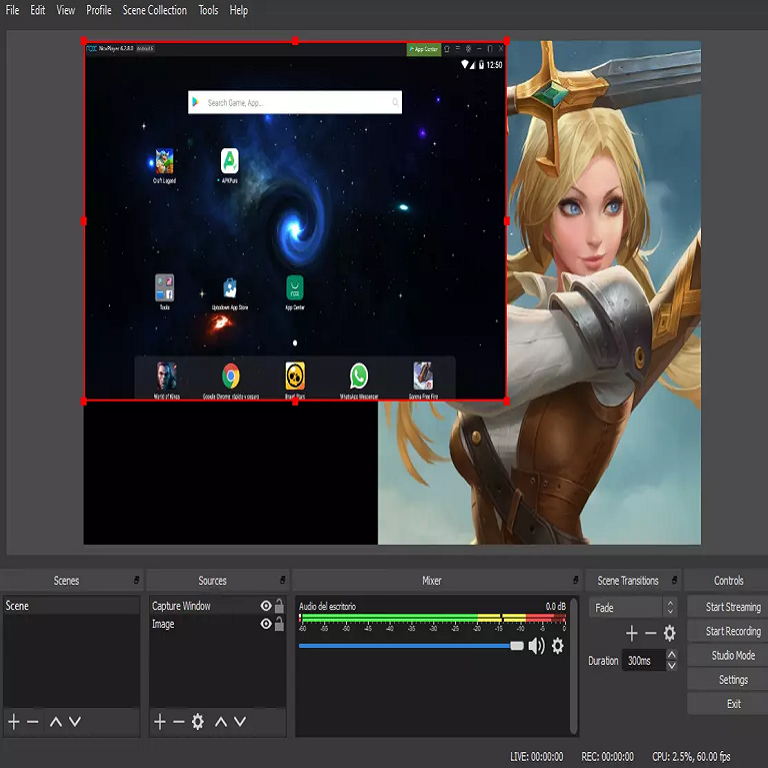
In OBS: Settings → Stream → Service: "Facebook Live" → Paste your Stream Key. Under Output, set Video Bitrate to 4000 kbps (Facebook's max).
FPS: 30 (60 for gaming)
Add Simulcast (Optional)
Sign up for Shoutcast Net, add Facebook as one destination and your website as another. Now when you click "Start Streaming," you broadcast to both!
Enhanced Facebook Live Features
No Time Limits + DVR
Facebook's native streaming has a 4-hour continuous limit (then you must restart). When you stream through our servers, broadcast for 24+ hours non-stop. Every stream automatically records to cloud DVR—viewers can pause, rewind, or watch later.
Perfect for all-day conferences, church marathons, charity telethons, and multi-hour gaming streams. After broadcast ends, instantly publish the recording to your video library.
Simulcast to Multiple Destinations
Broadcast to Facebook + your own website + YouTube + LinkedIn Live simultaneously from one stream. Reach audiences across platforms without Facebook exclusivity. If Facebook has technical issues, your website viewers continue uninterrupted.
Own your audience data. Embed our player on your website to build an email list, sell tickets, add paywalls, or monetize without Facebook's limitations.
Advanced Analytics
Facebook shows basic view counts. Our dashboard provides: real-time concurrent viewers, average watch time, viewer drop-off points (heatmap), geographic distribution, device types, referral sources, and peak viewership moments.
Export data for sponsor reports, optimize content based on engagement patterns, and prove ROI with detailed metrics Facebook doesn't expose.
Content Ownership & Backup
When you stream directly to Facebook, they own the content. If your account gets banned or Facebook changes policies, you lose everything. Our DVR creates a high-quality backup you own forever.
We record your stream in full 1080p quality (better than Facebook's compressed version), stored on your cloud account. Download anytime for editing, archiving, or republishing.
Who Uses Professional Facebook Live?
Churches
Stream Sunday services to Facebook for congregation + embed on church website for members without Facebook accounts. Record sermons automatically.
Small Businesses
Product launches, Q&A sessions, behind-the-scenes tours. Broadcast to Facebook followers + website visitors simultaneously for maximum reach.
Sports Teams
Stream local games to Facebook for fans + sell premium website access for extended coverage. Multi-camera production with instant replays.
Content Creators
Podcasters, musicians, educators who want Facebook reach without platform dependence. Own your recordings, analytics, and audience relationships.
Native Facebook vs. Professional Streaming
| Feature | Professional (Shoutcast Net) | Facebook Native App |
|---|---|---|
| Broadcast Duration | Unlimited | 4 hours max |
| Multi-Camera Support | ||
| Graphics & Overlays | ||
| DVR Recording | Auto-record 1080p | FB compressed only |
| Simulcast | Facebook + Website + More | Facebook only |
| Content Ownership | You own everything | Facebook owns |
| Analytics Depth | Detailed metrics | Basic views |
| Setup Complexity | 5 minutes (OBS config) | Instant (tap button) |
| Monthly Cost | $8 | Free |
Frequently Asked Questions
Yes! When you stream to Facebook using our service, you're still broadcasting to your Facebook Page/Profile. Viewers see your stream in their Facebook feed and can comment, react, and share exactly like native Facebook Live.
The only difference is you're using professional encoding software (OBS) instead of Facebook's mobile app—but to viewers, it looks identical.
You can stream to both! Facebook provides separate stream keys for Pages and Profiles. However, we recommend using a Business Page for professional content because:
- Pages get better analytics
- Pages support scheduled/recurring streams
- Pages allow persistent stream keys (don't change)
- Pages separate personal/business content
This is the #1 reason to use simulcasting! If you're streaming to Facebook only and Facebook has an outage (happens occasionally), your broadcast ends. But if you're simulcasting to Facebook + your website, website viewers continue watching uninterrupted.
Your DVR continues recording regardless of Facebook's status, so you never lose content even if Facebook disconnects.
Facebook has its own monetization programs (in-stream ads, Stars, fan subscriptions) that work with our streaming method. Additionally, when you simulcast to your website, you can add your own monetization: paywalls, ticket sales, sponsorships, ads, donations.
Many churches use this to accept tithes during live services, and businesses sell event tickets for premium website access while keeping Facebook free for promotional reach.
Upgrade Your Facebook Live Broadcasts
Stream unlimited hours to Facebook with professional quality. Simulcast to your website, auto-record every stream, own your content. Start free trial—no credit card required.
7-day free trial • Unlimited duration • Auto DVR recording
See Facebook Live Streaming In Action
Watch how Shoutcast Net makes streaming to Facebook Live effortless from any source
Facebook Live Streaming
Push your audio or video stream directly to Facebook Live with one click.
Restream to Facebook, Twitch & YouTube
Go live on Facebook, YouTube and Twitch simultaneously — reach every audience.
Easy 5-Minute Setup
Connect OBS or any encoder and start streaming to Facebook in minutes.