Node Media Server: Build Your Own RTMP Streaming Infrastructure
Learn everything about Node Media Server - the popular open-source Node.js streaming server for RTMP ingest and HLS/HTTP-FLV delivery. Discover setup, configuration, authentication, scaling strategies, and when DIY makes sense vs managed streaming solutions.
What is Node Media Server?
Node Media Server (NMS) is a lightweight, open-source streaming media server implementation written in Node.js. Created by Chinese developer illuspas, it provides a pure JavaScript alternative to traditional streaming servers like Nginx-RTMP, Wowza, or Red5. The project has gained significant traction in the developer community with over 5,900+ GitHub stars and is actively maintained.
Unlike heavyweight Java-based solutions or complex C++ implementations, Node Media Server leverages the Node.js event-driven architecture to handle concurrent connections efficiently. It implements multiple streaming protocols: RTMP for encoder ingest (OBS Studio, FFmpeg, VirtualDJ), HTTP-FLV for low-latency browser playback, WebSocket-FLV for HTML5 players, and HLS for adaptive bitrate streaming across devices.
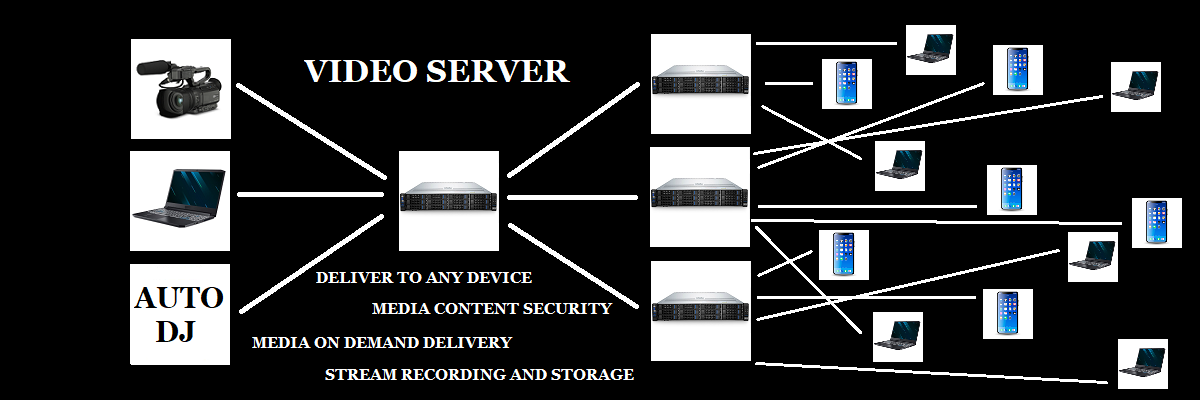
The server acts as middleware in streaming workflows: encoders push RTMP streams to the server, which transcodes them into multiple delivery formats. Built-in features include authentication hooks, session management, relay/edge configurations for CDN-like distribution, GOP cache for faster stream startup, and HTTP API for administrative control. It's ideal for developers building custom streaming platforms, educational projects, or prototyping before scaling to enterprise solutions.
Project Stats
- 5,900+ GitHub Stars
- MIT License Free & Open Source
- Node.js 10+ Minimum Requirement
- Multi-Protocol RTMP, HLS, HTTP-FLV, WS-FLV
Pure JavaScript
Written entirely in Node.js - no native dependencies or complex compilation
High Performance
Event-driven architecture handles hundreds of concurrent streams efficiently
Highly Extensible
Hook into publish/play events, add authentication, custom logic easily
Multi-Protocol
RTMP ingest with HLS, HTTP-FLV, WebSocket-FLV output protocols
Core Features & Capabilities
Protocol Support
Ingest Protocols
- RTMP: Industry-standard for OBS, vMix, FFmpeg encoders
- RTMPS: Secure RTMP over TLS/SSL encryption
- RTMPT: RTMP tunneled over HTTP (firewall bypass)
Delivery Protocols
- HTTP-FLV: Low-latency browser streaming (1-3 sec)
- WebSocket-FLV: HTML5 WebSocket for modern players
- HLS (m3u8): Adaptive bitrate for iOS, Android, Smart TVs
- DASH: MPEG-DASH for universal compatibility (experimental)
Advanced Features
-
Authentication & Security:
Publish/play authentication hooks, token-based access, IP whitelisting -
GOP Cache:
Cache Group of Pictures for instant stream startup (reduces buffering) -
Relay/Edge Mode:
Multi-server distribution for scalability and CDN-like architecture -
FFmpeg Integration:
Transcoding, recording, thumbnails via FFmpeg subprocess -
HTTP API:
RESTful API for server stats, stream management, admin control -
Event Hooks:
Callbacks for prePublish, postPublish, prePlay, postPlay, donePublish
System Architecture & Workflow
Streaming Workflow
-
Encoder Connection: OBS Studio/FFmpeg connects via RTMP to
rtmp://yourserver:1935/live/streamkey - Authentication: Node Media Server triggers prePublish event, validates credentials/token
- Stream Processing: Server accepts RTMP stream, caches GOP for instant playback
- Protocol Conversion: Transcodes to HTTP-FLV (low latency) and HLS (adaptive)
- Viewer Delivery: Players connect via HTTP-FLV (1-3s latency) or HLS (4-30s latency)
- Recording (Optional): FFmpeg records stream to MP4/FLV for VOD replay
Server Requirements
Minimum (5-10 streams):
- • 2 CPU cores
- • 2 GB RAM
- • 50 GB storage
- • 100 Mbps network
- • Ubuntu 20.04+ or CentOS 8+
Recommended (20-50 streams):
- • 4-8 CPU cores
- • 8-16 GB RAM
- • 200 GB SSD storage
- • 1 Gbps network
- • Load balancer for scaling
Tech Stack
- Runtime: Node.js 10.x or higher
- NPM Package: node-media-server
- Optional: FFmpeg for transcoding
- Database: Optional (Redis, MongoDB)
- Process Manager: PM2 recommended
Common Use Cases & Applications
Education & E-Learning
- • Live lecture broadcasting to students
- • Virtual classroom platforms
- • Recorded course delivery (VOD)
- • Interactive webinar hosting
- • Campus TV station infrastructure
Gaming & Esports
- • Self-hosted streaming platform
- • Tournament broadcasting infrastructure
- • Private gaming community streams
- • Low-latency competitive gameplay
- • Game server status/CCTV feeds
Enterprise & Corporate
- • Internal company broadcasts
- • Town hall meetings & CEO updates
- • Product launch live events
- • Training session delivery
- • Private network streaming (intranet)
Surveillance & Monitoring
- • IP camera feed aggregation
- • Remote security monitoring
- • Traffic/weather camera feeds
- • Industrial process monitoring
- • Building management systems
Development & Prototyping
- • Learning streaming technology
- • Testing encoder configurations
- • MVP/proof-of-concept platforms
- • Custom streaming app development
- • Academic research projects
Media & Broadcasting
- • Internet radio station infrastructure
- • Community TV broadcasting
- • Live event production backend
- • Podcast recording/streaming
- • Multi-channel OTT platform
DIY Node Media Server vs Managed Streaming Services
Understanding when to self-host vs when to use managed solutions like Shoutcast Net
| Factor | Node Media Server (DIY) | Shoutcast Net (Managed) |
|---|---|---|
| Initial Cost | Free software + $5-20/mo VPS | $4-8/mo all-inclusive |
| Setup Time | 2-8 hours (technical knowledge required) | 5 minutes (click and stream) |
| Technical Expertise | High (Linux, Node.js, networking, security) | None (managed interface) |
| Maintenance | Self-managed (updates, patches, monitoring) | Fully managed (zero maintenance) |
| Support | Community forums, GitHub issues | 24/7 professional support |
| Uptime Guarantee | None (you manage reliability) | 99.9% SLA |
| Scalability | Manual (add servers, load balancers) | Automatic (cloud infrastructure) |
| Security | Self-managed (firewall, SSL, patches) | Enterprise-grade security included |
| Bandwidth Costs | Pay per GB (can be expensive at scale) | Unlimited included |
| Customization | Full control (modify source code) | Limited (managed configuration) |
| AutoDJ/Automation | Not included (DIY with Liquidsoap) | Built-in AutoDJ included |
| Analytics | Basic (custom implementation needed) | Advanced dashboard included |
| Best For | Developers, learning, custom requirements, large scale | Broadcasters, beginners, businesses, hassle-free |
Decision Guide
Choose Node Media Server if you:
- Have technical expertise in Linux/Node.js
- Want full control over infrastructure
- Need custom features not in managed solutions
- Are building a learning project
- Stream at very large scale (100+ concurrent streams)
- Have time for setup and maintenance
- Don't need 24/7 support
Choose Managed Solution if you:
- Want to focus on content, not infrastructure
- Need 99.9% uptime guarantee
- Require 24/7 professional support
- Are a beginner or small business
- Value time over technical control
- Need AutoDJ automation included
- Want hassle-free scaling and security
Real Cost Analysis: DIY vs Managed
Node Media Server Total Cost of Ownership
Monthly Costs:
- • VPS Hosting (2 CPU, 2GB RAM): $10-20
- • Bandwidth (1TB @ $0.10/GB): $100
- • Domain name & SSL certificate: $2-5
- • Monitoring tools (UptimeRobot, etc.): $0-10
- Subtotal Infrastructure: $112-135/mo
Hidden Costs:
- • Setup time (8 hours × $50/hr): $400 one-time
- • Monthly maintenance (4 hours × $50/hr): $200/mo
- • Downtime cost (99% uptime = 7.2 hrs down/mo): Variable
- • Security incidents & recovery: Risk
- Total Monthly: $312-335+
Note: Costs scale up quickly with traffic. At 5TB bandwidth, you're paying $500+ just for bandwidth, not including the 20+ hours/month managing infrastructure.
Shoutcast Net Managed Service Cost
Audio Streaming Plans:
- • 100 listeners: $4/mo
- • 500 listeners: $8/mo
- • 1000 listeners: $16/mo
- • Unlimited bandwidth included
- • AutoDJ automation included
- • 24/7 support included
- Total Monthly: $4-16
Video Streaming Plans:
- • HD Video Server: $8-16/mo
- • Unlimited bandwidth included
- • RTMP + HLS delivery
- • Multi-platform restreaming available
- • 99.9% uptime SLA
- • Zero maintenance required
- Total Monthly: $8-16
Included: Setup, maintenance, security, monitoring, support, backups, updates, analytics - everything. Focus on content, not infrastructure.
Break-Even Analysis
For most broadcasters streaming to under 1,000 concurrent viewers, managed services are more cost-effective when you account for setup time, maintenance, bandwidth overages, and downtime costs. DIY becomes competitive only at enterprise scale (10,000+ viewers) with dedicated DevOps team.
Managed wins: $4-8/mo vs $300+/mo DIY total cost
Managed still wins: Predictable pricing, no surprise bandwidth bills
DIY becomes viable: Economies of scale with dedicated team
Frequently Asked Questions
Skip the Setup Headaches - Go Live in Minutes
While Node Media Server is great for learning, Shoutcast Net offers professional streaming infrastructure with 99.9% uptime, 24/7 support, and zero maintenance. Start streaming immediately without Linux servers, Node.js debugging, or bandwidth surprises.